Works with familiar booking platforms
Keep Airbnb, VRBO, and Booking.com in the mix while RentalBeam handles your website flow.

Pro booking widget
Add a booking form to any page with a simple embed, keep Airbnb and VRBO in the mix, and give guests one clear path from available dates to inquiry, secure payment after approval, or card payment in the widget. Show pricing when it helps, or keep it hidden when you prefer to quote manually. RentalBeam is built for hosts who want direct-booking functionality without a full PMS or custom-coded checkout.
Direct booking workflow
One booking widget, one dashboard, and one host workflow from first request to paid stay.
Availability calendar
Synced and ready for direct bookings
Guest booking
Website booking live
Guest stays on your site from dates to payment
Next step
Host stays in control
Quiet proof
Use RentalBeam as the booking layer on your website while keeping Airbnb, VRBO, and Booking.com in the mix. When you enable guest card payments on Pro, Stripe can show familiar card brands plus Apple Pay and Google Pay where the guest device, browser, region, and account setup support them.
Works with familiar booking platforms
Keep Airbnb, VRBO, and Booking.com in the mix while RentalBeam handles your website flow.
Supports many major cards and wallets on Pro
Turn on guest payments when you are ready. Card brands and wallets such as Apple Pay and Google Pay appear where Stripe, device, browser, and region support them.
Secure card processing
Hosts use RentalBeam day to day. Stripe supports card processing and payouts underneath the same host workflow.
Third-party names and logos are used for identification only and remain the property of their respective owners.
Sync your availability, paste the booking widget into your site, and keep guests on your website from dates to inquiry, secure pay-later, or payment on Pro.
Add your Airbnb, VRBO, Booking.com, or other iCal sources so guests only request genuinely open dates.
Show pricing or keep it hidden, then set rates, seasonal overrides, fees, discounts, payment steps, custom fields, and booking rules.
Paste the booking form on your website and start receiving reservation requests, secure pay-later follow-up, or guest card payments from the same embedded form.
See the guest flow
The booking form stays simple on purpose: guests choose dates, review the stay, and continue in the flow you choose. Keep it inquiry-first, approve first and send a secure payment link later, or let guests pay in the widget. Pricing can stay visible or hidden.
The real RentalBeam demo booking form, shown the way your guests see it on your own website.
Booking-ready foundation
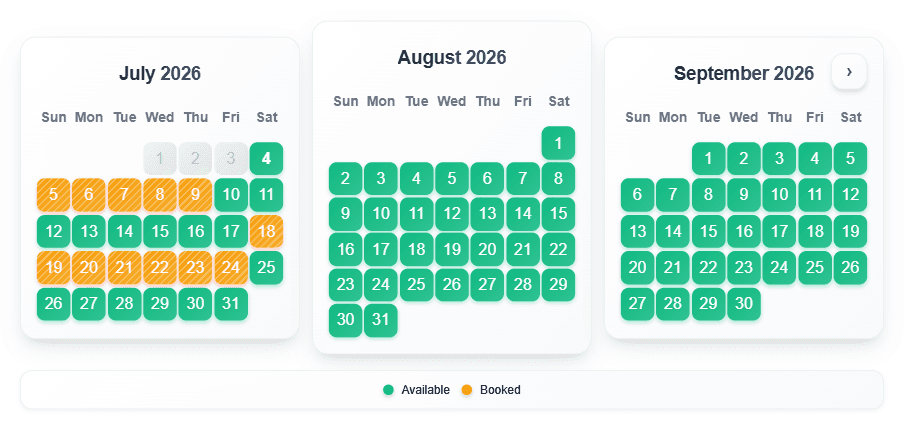
The synced calendar that powers direct bookings
Built on synced availability
RentalBeam builds the booking widget on a live calendar foundation that stays aligned with Airbnb, VRBO, Booking.com, and your own manual date controls.
If a date is blocked elsewhere, it should stay blocked here too.
Why hosts add it
RentalBeam keeps the direct-booking story simple: your own website, your own guest relationship, and one workflow from request to review to payment - whether you collect later or in the widget.
When a guest finds you directly, RentalBeam gives them a clear booking path on your own website instead of sending that relationship somewhere else.
The booking form uses the same synced iCal availability and manual date controls as your calendar, so guests only request genuinely open dates.
Every request lands with the stay details, guest information, and message so you can confirm, decline, or send a secure payment link from one review screen.
What Pro adds
Pro takes no commission and no RentalBeam booking fee on your direct bookings. Hosts can show pricing or keep it hidden, stay inquiry-first, send a secure payment page after approval, or collect Stripe-powered card and wallet payments in the widget where available - card payments only carry the standard Stripe processing fee.
Uses the same synced iCal availability and manual blocks as your calendar widget, and re-checks live before instant reservations to prevent double bookings
Show nightly pricing, or hide it and quote manually after the request
Approve the request, then send a secure hosted payment page when you are ready to collect
Collect a deposit now and the balance later with multiple payment steps for one stay
Send branded invoice PDFs with customizable payment details and guest-facing notes
Override nightly rates, minimum stay, and discounts for specific date ranges
Cleaning, pet, service charges - flat or per-night/guest
Weekly/monthly, early-bird, and last-minute discounts with stacking controls
Collect guest details with text, email, phone, number, dropdown, checkbox, date, time, and file upload fields - including photo ID and document uploads
Advance notice, prep time, allowed check-in/out days, and same-day cutoff
Up to 3 notification emails with secure review links. Hit reply to message the guest from your inbox - their reply comes straight back to you.
Synced proof
The booking form uses the same iCal sync foundation as the availability calendar, so direct requests reflect the same genuinely open dates your guests already see elsewhere.
Luxury Coastal Property
Click arrows to see different property calendars
Why it works
RentalBeam gives independent hosts one direct-booking workflow that stays connected from open dates to host review, secure pay-later requests, invoice PDFs, and optional guest payments.
The booking widget uses the same synced availability, pricing visibility, rules, and date controls as the rest of your RentalBeam setup.
Stay inquiry-first, approve first and send a secure payment link later, or let guests pay at booking time when your site is ready for faster checkout.
Requests, guest details, payment links, invoice PDFs, payment steps, and calendar-specific settings stay connected to the same RentalBeam workflow.
Pro takes no commission and no RentalBeam booking fee, so more of every direct booking stays with you - card payments only carry the standard Stripe processing fee.
Common questions about vacation rental booking widgets
No. RentalBeam Pro takes zero commission and adds no RentalBeam booking fee - your direct booking revenue is 100% yours. The booking form widget, guest payment workflow, coupon codes, seasonal pricing, custom fields, and booking rules are all included. The only cost when a guest pays by card through RentalBeam is the standard Stripe card-processing fee, which is paid to Stripe, not RentalBeam. Inquiry-only and pay-later flows have no per-transaction cost.
No. RentalBeam never takes a commission on your booking revenue on any plan, and Pro adds no RentalBeam booking or application fee. If a guest pays by card through RentalBeam, only the standard Stripe card-processing fee applies - that fee goes to Stripe, the same as any payment processor. Inquiry-only, pay-later, and off-platform bookings (such as bank transfer) have no per-transaction cost at all.
Yes. RentalBeam Pro includes coupon codes, percentage and fixed-amount discount rules, and seasonal pricing tiers. You can run promotional codes for repeat guests, configure off-season discounts, and combine them with custom fees and booking rules from the same booking form widget setup.
Yes. On Pro, every booking notification email includes a reply address linked to that booking. Reply in Gmail, Apple Mail, or any email app and your message goes to the guest. When they reply, it comes back to your inbox and is saved in the dashboard Messages tab. Your personal email address is never shared with the guest.
A booking widget is a form embedded on your own website that lets guests send reservation requests directly to you. It shows current availability, optionally displays pricing, and collects guest details in one form.
No - it works alongside them. You keep your existing listings on those platforms and add a direct booking option on your own website, so guests who find you directly have a clear path to contact and book with you.
Learn how synced availability, direct booking requests, payment setup, and a simple website embed fit together.
Start free, then upgrade to Pro when you want booking requests, secure pay-later links, invoice PDFs, and guest card payments on your own site - no full PMS or complex code required.