

How to sync your Airbnb calendar with your website
To sync your Airbnb calendar with your website, export your Airbnb iCal link and connect it to a calendar widget that refreshes on its own, so guests always see accurate availability. This guide walks through the exact steps, then how to combine VRBO and Booking.com feeds and export a single URL. No coding required, no expensive PMS software needed.
How it works
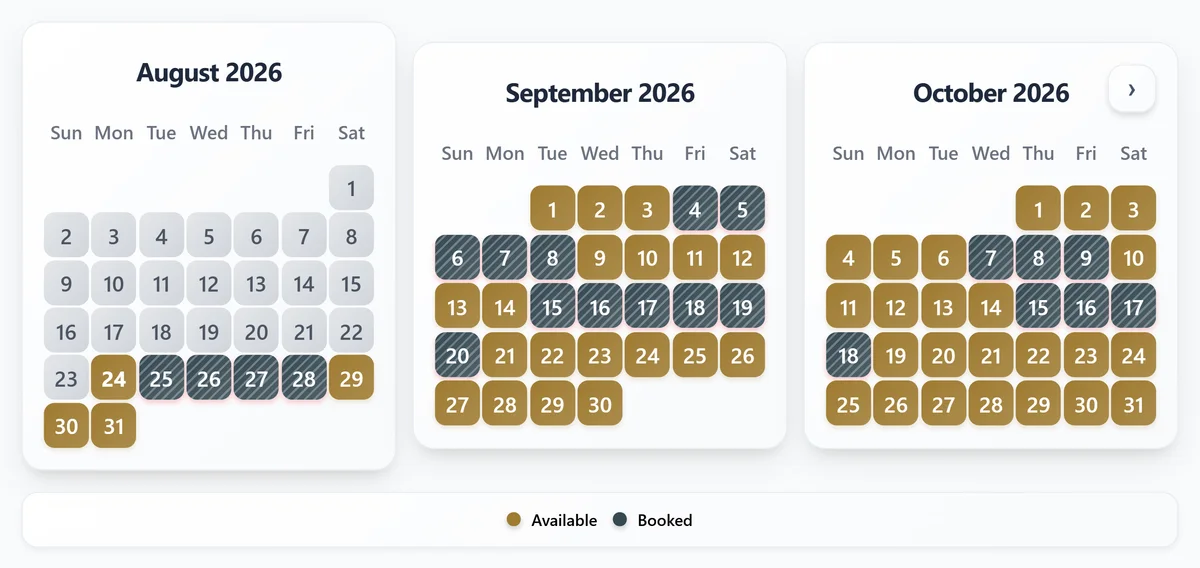
Airbnb generates a unique iCal feed for each listing (a live URL that encodes your booking and availability data in a format any calendar tool can read). When you connect it to your website, your site always reflects what is actually booked.
Nights booked on Airbnb appear blocked on your website. If you list on multiple platforms, you can import several iCal feeds and merge them into one unified calendar view.
On Plus and Pro, you can also export that unified calendar back out as one combined iCal URL for Google Calendar or OTA imports where supported, so each platform reads one URL instead of several.
Why this approach? (No expensive PMS required)
You don't need an expensive Property Management System to keep your website calendar in sync. Enterprise PMS solutions charge monthly fees (often $50-$500+) and lock you in: you run everything through their dashboard.
Here is how the three realistic ways to keep availability on your own website actually compare:
| Approach | Monthly cost | Setup | Stays in sync | Keep managing on Airbnb/VRBO |
|---|---|---|---|---|
| iCal availability widget | Free to start | About 2 minutes | Yes, automatic | Yes |
| Full PMS with a website module | $50 to $500+ | Hours, plus moving your operation in | Yes | No, the PMS becomes your workflow |
| Updating your site by hand | Free | Ongoing, after every booking | No, you edit it yourself | Yes |
The iCal script approach is different:
- Free: No monthly subscription fees. RentalBeam offers free calendar syncing with iCal feeds.
- Simple setup: Get started in minutes, not hours. Paste a URL and embed a widget - no configuration, no learning curve.
- Direct control: Continue managing your listings directly in Airbnb, VRBO, Booking.com, and other platforms you already use.
- No vendor lock-in: Switch widgets or remove the calendar anytime. Your data stays yours, your website stays yours.
- Works anywhere: Embeds on WordPress, Wix, Squarespace, Webflow, custom sites - any platform that supports HTML. Upgrade to Plus or Pro for advanced customization options with monthly or annual billing, and each plan's starting tier comes with a 7-day free trial.
Cost comparison
Enterprise PMS platforms charge $50-$500/month and often force you to replace your entire booking workflow. This free iCal approach integrates with your existing setup in under 5 minutes.
What you need
- An active Airbnb listing
- Access to your website (any builder that supports custom HTML)
- Your Airbnb host login
Setup steps
- 1
Get your Airbnb iCal URL
- Go to airbnb.com/hosting/calendar and select a listing
- Click Availability in the right panel
- Under Connect calendars, click Connect to another website
- Copy the URL shown under the Export section
Keep this URL private
The iCal URL is tied specifically to your listing. Anyone who has it can view your booking dates. Do not share it publicly or post it in unsecured locations. - 2
Create your calendar widget
- Open the RentalBeam dashboard
- Click Add Rental
- Paste your Airbnb iCal URL
- Give the rental a name (e.g. "Beachfront Villa")
- Optionally adjust colors and styling to match your site
- Click Create Widget
You can add iCal URLs from VRBO, Booking.com, or any other platform to merge all your booking sources into one calendar widget.Upgrade path for easier calendar management
Free is a good way to publish availability on your website. Plus and Pro add source aggregation up to 10 feeds per rental, manual date blocking, combined export URLs, sync-health visibility, export access tracking, and Google Calendar quick-add.New to RentalBeam? Learn about the free Airbnb calendar widget.
- 3
Embed the widget on your website
Copy the embed code from your widget settings and paste it into your site:
html<iframe src="https://rentalbeam.com/embed/your-widget-id" width="100%" height="446" frameborder="0" style="border: none; border-radius: 8px;"> </iframe>Website builder install steps
Choose your site builder for the fastest copy-and-paste path, then open a builder-specific guide if you want more detail.
Recommended: ScriptWordPress
Best fit when you can add a Custom HTML block or plugin.
WordPress supports the full script embed, which keeps the calendar responsive and closer to the default RentalBeam experience.
Use the Script tab for this builder.
- Edit the page where guests check availability
- Add a Custom HTML block
- Paste the RentalBeam calendar embed code
- Preview the page and publish the update
Before you publish
- Paste the embed into a Custom HTML block, not a Paragraph block, so WordPress does not escape the code.
- Keep the calendar close to your main inquiry or booking CTA so guests can check dates and act without scrolling back up.
- After changing months-per-row, rows, or month size in RentalBeam, copy the updated embed and re-open the live preview so the published layout matches the current settings.
- 4
Verify the integration
- Open your website and confirm the calendar renders
- Check that booked Airbnb dates appear as unavailable
- Test on a mobile device to confirm the responsive layout
- Verify in a second browser to rule out caching issues
Sync behavior
Once connected, changes on Airbnb propagate to your website automatically:
- New bookings: The date becomes unavailable on your site
- Cancellations: The date opens up again automatically
- Blocked dates: Maintenance or personal blocks from Airbnb appear as unavailable
- Multiple platforms: All connected feeds merge into one unified view
Manual refresh
You can trigger an immediate refresh from the RentalBeam dashboard at any time rather than waiting for the next automatic update cycle.
Two clocks, not one
RentalBeam re-checks your imported feed at most every 15 minutes. Separately, a change has to reach Airbnb's own iCal feed before RentalBeam can read it, and that part is set by Airbnb, not by us.
Syncing other platforms
The same widget merges availability from any iCal source, so most hosts connect more than one platform. See the dedicated guides for syncing your VRBO calendar with your website and syncing your Booking.com calendar with your website.
Go beyond one-way sync
A simple website embed solves the visibility problem, but many hosts also want a cleaner way to keep all their calendars aligned. RentalBeam Plus and Pro let you import Airbnb, VRBO, Booking.com, and other iCal feeds into one calendar, manually add owner blocks or maintenance windows, and export one combined iCal URL back out again.
- Combined export URL: subscribe in Google Calendar or import into OTA calendars where iCal import is supported.
- Home tab: see Healthy, Stale, or Error status plus last-sync timestamps for every source, right on the rental's row.
- Export access tracking: confirm when Airbnb, VRBO, or Google Calendar last fetched your export.
- Google Calendar quick-add: open a one-click webcal subscription directly from your dashboard.