Works with familiar booking platforms
Keep Airbnb, VRBO, and Booking.com in the mix while RentalBeam handles your website flow.
Trailer and equipment rental operators
Show live availability for every trailer on your own website, then take rental requests with tow vehicle details, hitch class, license numbers, and photo ID uploads, with no separate form builder required.

Works alongside your stack
RentalBeam handles the host workflow while iCal feeds keep availability aligned. Stripe supports guest card payments and wallet options such as Apple Pay and Google Pay where available on Pro.
Works with familiar booking platforms
Keep Airbnb, VRBO, and Booking.com in the mix while RentalBeam handles your website flow.
Supports many major cards and wallets on Pro
Turn on guest payments when you are ready. Card brands and wallets such as Apple Pay and Google Pay appear where Stripe, device, browser, and region support them.
Secure card processing
Hosts use RentalBeam day to day. Stripe supports card processing and payouts underneath the same host workflow.
Third-party names and logos are used for identification only and remain the property of their respective owners.
Product facts
What you get before you publish a direct booking path.
Why it fits
RentalBeam keeps the guest-facing website flow focused: accurate dates, and payment only when it suits how you host.
The availability calendar and the booking form come from the same dashboard, so you do not need to stitch a third-party form builder onto your calendar.
Custom fields collect tow vehicle, hitch class, and license details with the request, and renters can upload a photo ID on Pro.
Review each request, verify the renter and the equipment fit, then confirm, with an optional secure payment link after approval.
Set the trailer to a vehicle or equipment under Booking settings on the Setup tab and the booking form and your emails say pick-up and drop-off, count days, and ask for no guest count, in all 24 languages. Per-day pricing, fees for straps, dollies, or delivery, and long-rental discounts are unchanged.
Dashboard
The calendar and form are what visitors see. Behind them sits the RentalBeam dashboard where you review, manage, and get paid for every booking - all on your own website, and we never take a cut.
Request review
A renter picks dates and fills in the fields you set up on your trailer rental website, tow vehicle and hitch class included if you ask for them. The request arrives by email with a secure review link where you check the fit before you commit, then approve, decline, or send a payment request.
Custom fields
Add the questions your counter needs: tow vehicle, hitch class, license number, up to 20 fields per rental. Add a file-upload field so renters attach a photo ID or document, and view it securely from the booking in your dashboard.
Payments
We never take a cut of what you charge. Approve a request and send a secure pay-later link, let customers pay by card in the widget through Stripe, or record a bank transfer yourself, with a branded invoice PDF either way.
What your guests receive
Request received, payment request, confirmed, changed, canceled, reminders: each one carries your rental name, your colors and your logo. Preview any of them from the Emails tab, or send yourself a test before a guest ever gets one.
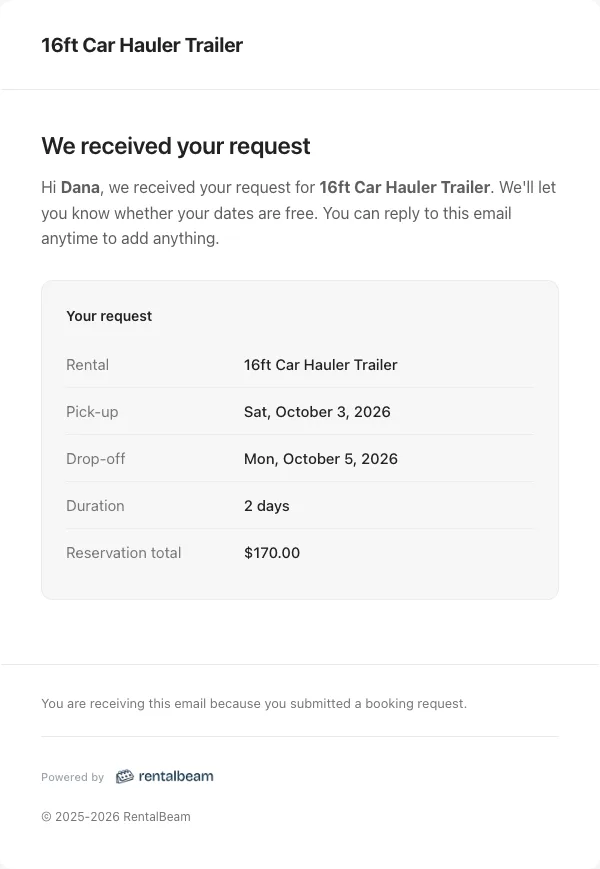
The moment they submit
Pick-up, drop-off, days and total. No guest count on a vehicle.
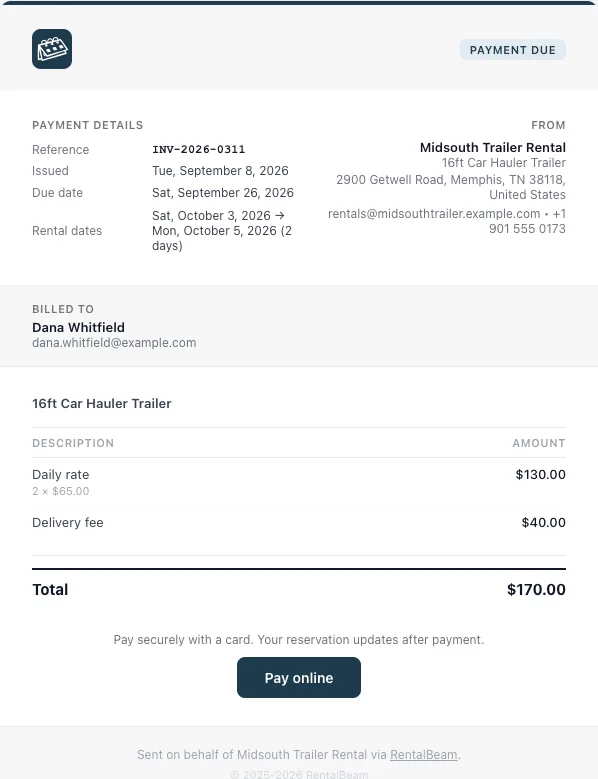
When you ask for money
Daily rate, delivery fee, one button. Your business name and address on it.
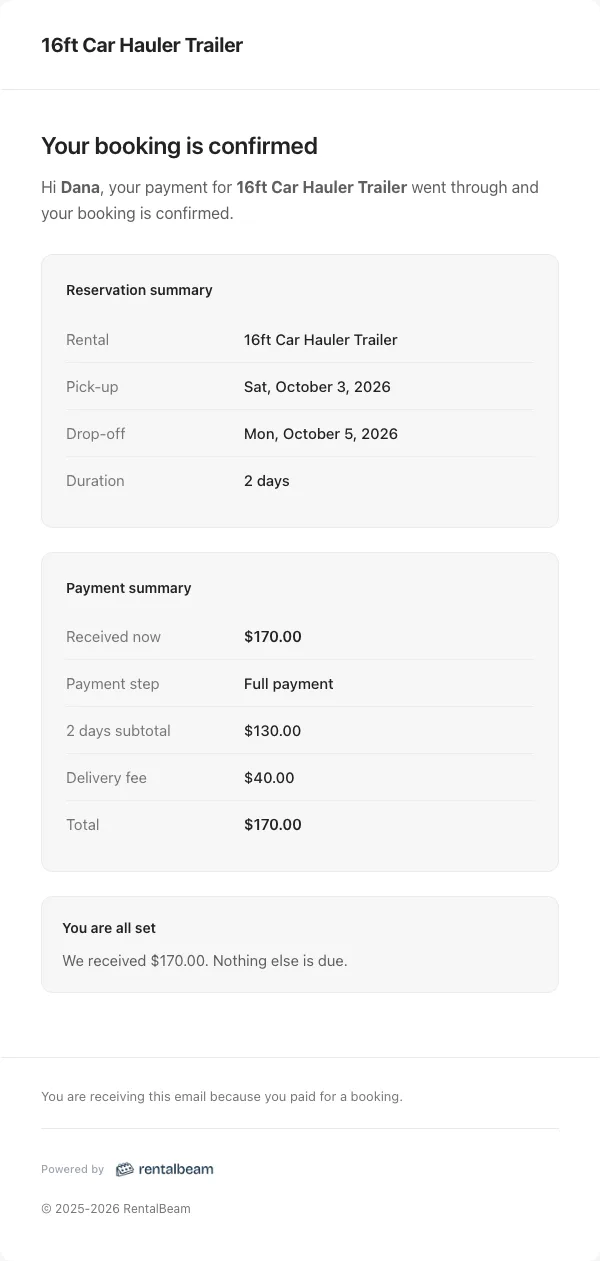
When it is confirmed
What was paid, what was booked, and that nothing else is due.
Booking flows
Start inquiry-first, request payment after approval, or take payment in the widget when your pricing and payout setup are ready.
Lowest commitment
Hosts who want to screen, quote, or reply manually before anything is confirmed.
Guests send dates and details from your website. You review the request and reply with the next step.
Approval first
Hosts who want a clear booking request first, then a secure payment link after approval.
Guests send the request, you approve it, then send a secure payment request for deposit, balance, or full payment.
Fastest checkout
Hosts with reliable pricing who want guests to complete card payment during the website flow.
Guests choose dates, review the total, and pay in the booking widget when Stripe-powered payments are enabled.
How to use it
Start with the piece that solves today's problem, then add the booking and payment layers when the guest journey is ready.
Best first step
Start with the free calendar widget so customers can see open dates for each trailer before they call.
ExploreBooking layer
Take rental requests with dates and the tow, license, and ID details your counter checklist needs.
ExplorePayments
Send a secure payment request once you approve, or take card payment during submission on Pro.
ExploreRelated solutions
Compare the same booking engine through nearby host types, then pick the one closest to what you rent.
Vacation rental hosts
Show synced availability from Airbnb, VRBO, and any iCal source on your website. Then, on Pro, give guests a booking form where they can inquire, get a payment link after you approve, or pay directly in the widget.
Bed-and-breakfast owners
Give guests a professional B&B booking path without adopting a full PMS. Use inquiry-first requests, send secure payment links after approval, or enable Stripe-powered guest payments on Pro when your pricing is ready.
Boutique and small hotels
Add a direct booking widget, live availability, and optional guest payments to your hotel website. RentalBeam handles the guest-facing booking path while your front-desk and operations tools stay separate.
Common questions for trailer and equipment rental operators
No. RentalBeam Pro takes no commission and no booking fee - your direct booking revenue is 100% yours. The booking form widget, guest payment workflow, coupon codes, seasonal pricing, custom fields, and booking rules are all included. The only cost when a guest pays by card through RentalBeam is the standard Stripe card-processing fee, which is paid to Stripe, not RentalBeam. Inquiry-only and pay-later flows have no per-transaction cost.
No. RentalBeam never takes a commission on your booking revenue on any plan, and Pro adds no RentalBeam booking or application fee. If a guest pays by card through RentalBeam, only the standard Stripe card-processing fee applies - that fee goes to Stripe, the same as any payment processor. Inquiry-only, pay-later, and off-platform bookings (such as bank transfer) have no per-transaction cost at all.
Yes. RentalBeam Pro includes coupon codes, percentage and fixed-amount discount rules, and seasonal pricing tiers. You can run promotional codes for repeat guests, configure off-season discounts, and combine them with custom fees and booking rules from the same booking form widget setup.
Yes. RentalBeam Pro supports percentage fees built for taxes: you enter the rate (up to three decimals, so rates like 8.875% work) and it is calculated on the discounted subtotal plus your other fees, the same base tax authorities use. The rate can be added on top of your prices (US-style sales tax) or shown as already included in them (EU-style VAT, with an "Includes Tax" line under the total). You can exclude individual fees from the tax base when your jurisdiction does not tax them, and guests see the tax clearly labeled with the rate. Fixed per-person tourist taxes are also supported through per-guest-per-night fees with child age rules.
Yes. On Pro, every booking notification email includes a reply address linked to that booking. Reply in Gmail, Apple Mail, or any email app and your message goes to the guest. When they reply, it comes back to your inbox and is saved in the dashboard Messages tab. Your personal email address is never shared with the guest.
Not if you set the rental to a vehicle or equipment under Booking settings on the Setup tab. The form, your emails, and your dashboard then say pick-up and drop-off, count days instead of nights, and ask for no guest count. A day is the 24-hour period that starts at pick-up, so Monday to Tuesday is one day.
Yes, for day-based rentals. Each trailer gets an embeddable availability calendar, and on Pro a booking form with custom fields, photo ID uploads, and optional Stripe-powered card payments. Hourly slots are not supported.
That is the goal. The Pro booking form supports up to 20 custom fields per rental: text, dropdowns, checkboxes with fees, dates, times, numbers, and file uploads, so the calendar and the form finally live in one tool.
Yes. On Pro, add a file upload field and renters can attach a photo ID or document (image or PDF, up to 10 MB) with their request. You view it securely from the booking in your dashboard.
Two ways to get paid: review the request and send a secure payment link, or let customers pay by card in the widget on Pro. Both pay out to your own Stripe account, and RentalBeam takes no commission on your booking revenue.
Trailer and equipment rental operators
RentalBeam gives trailer and equipment rental operators live availability on their own website with automatic iCal sync from Airbnb, VRBO, Booking.com, Google Calendar, and any other iCal-compatible source. The availability calendar is available on the Free plan, while Plus and Pro add more control over sources, managed dates, combined exports, custom colors, branding removal, and per-source sync health. On Pro, the same calendar becomes a real direct-booking surface with a booking form widget, coupon codes, seasonal pricing, configurable booking fees, custom guest fields, booking rules, and optional inline guest card payments through Stripe Connect.
RentalBeam works alongside your OTA listings rather than replacing them. It is not a full PMS, a channel manager, or a website builder. What it does is take you from a plain website calendar to direct bookings on your own site.
RentalBeam Pro is a single direct-booking plan with no commission and no booking fee. It unlocks the booking form widget, guest-payment workflow, coupon codes, seasonal pricing, custom fields, booking rules, host email tools, and reply-from-inbox guest messaging. RentalBeam never takes a cut of your booking revenue. When a guest chooses to pay by card through RentalBeam, the only deduction is the standard Stripe card-processing fee, which is paid to Stripe - not RentalBeam. Inquiry-only, pay-later, and off-platform bookings (such as bank transfer) carry no per-transaction cost at all.
Continue with the practical setup and strategy guides behind this solution.
Start with a free availability calendar, then add booking requests, secure pay-later links, payment PDFs, and optional guest card payments on Pro.