

Keep more direct-booking revenue
A clear website calendar helps guests check open dates on your own site before they return to a platform with booking fees, so more stays start with you instead of an OTA listing.
Website availability
Display up-to-date availability from Airbnb, VRBO, Booking.com, and any iCal source with one website embed. Start free, then add source aggregation, export URLs, the appearance studio, and direct bookings when you are ready. No PMS, no code - setup in about 2 minutes.
How to get your iCal URL:
Paste an iCal link above. Your live preview and embed code appear here.
See it live
Rotate through example rentals to see how live availability can sit naturally on a vacation rental website with a copy-paste embed.
Luxury Coastal Property
Click arrows to see different rental calendars
Why hosts add it
A synced website calendar makes your own site feel more complete and trustworthy, and less dependent on sending guests back to a marketplace just to check dates.
A clear website calendar helps guests check open dates on your own site before they return to a platform with booking fees, so more stays start with you instead of an OTA listing.
Aggregate booking-platform feeds into one calendar now, then add combined export URLs and per-source sync health when you want more control.
A live calendar builds trust with guests while iCal feeds expose blocked dates only, never guest names or personal data.
Everything behind the calendar
The calendar is the guest-facing part. In your dashboard it is backed by a sync engine, an appearance studio, and collections that keep every rental accurate and on-brand.
Sync engine
Import feeds from Airbnb, VRBO, Booking.com, Google Calendar, or any iCal URL and RentalBeam aggregates them into a single view that refreshes on its own - then exports one combined feed back out so your channels stay aligned both ways.
Appearance studio
On Plus and Pro, start from a one-click preset scheme, then fine-tune the available, booked, and closed colors, pick a font and background, and remove RentalBeam branding. Light, dark, or auto follows your website theme.
Collections
Group your rentals into a collection and embed them as a combined availability view, a timeline of every rental side by side, or per-rental tabs - each member keeps its own sources and settings.
Calendars tab
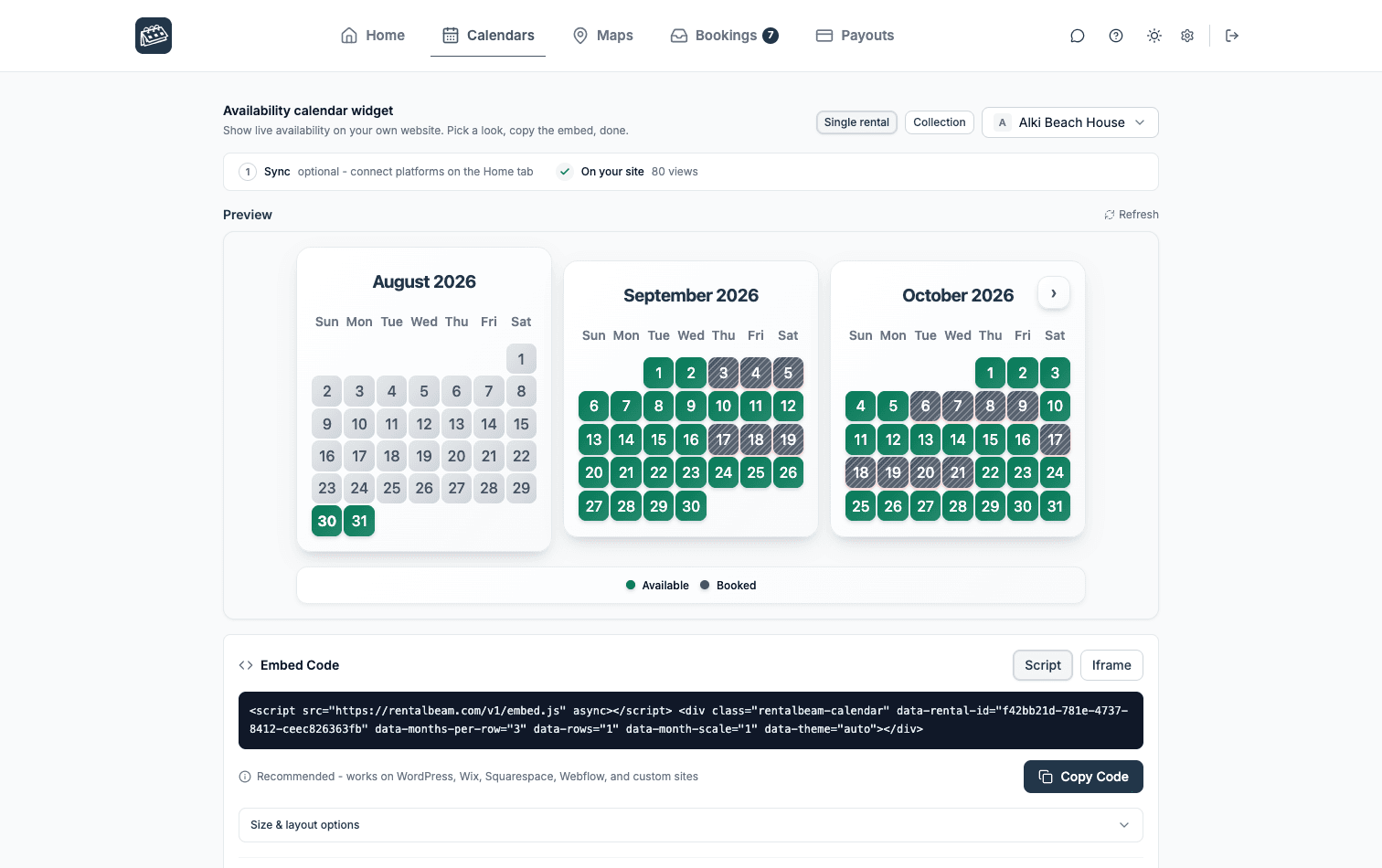
The widget builder in your dashboard
Your side of it
Every rental gets its own Calendars tab. It shows the calendar exactly as guests will see it on your website, with the embed code right under the preview and a count of how often it has been viewed on your site.
Pick a look, copy the code, and the dates take care of themselves.
Calendar controls
Start with one source on the Free plan. Plus and Pro add 10 sources per rental, manual date controls, export URLs, Google Calendar quick-add, branding removal, and sync monitoring.
Availability calendar
Availability stays current on its own, across every channel you use.
Style it, control it, and scale it to match your brand and portfolio.
Free to start, private by default, and ready for every visitor.
Speaks your guests' language
Auto-detected from the guest's browser or forced to one language, so international guests always read open and booked dates in their own words.
Pro upgrade: Booking form
Start with the free availability calendar. On Pro, upgrade to a direct booking form where guests can request dates, receive a payment link after approval, or pay in the widget from your own site.
The real RentalBeam demo booking form, shown the way your guests see it on your own website.
Availability calendar starts on the Free plan with 1 rental and 1 iCal source. Plus and Pro add source aggregation, export URLs, and advanced date controls.
Copy the export link from Airbnb, VRBO, Booking.com, or any iCal-compatible platform.
Paste the iCal URL, choose colors and language, and preview the calendar instantly.
Copy the snippet and paste it into your website builder or any HTML page.
Go deeper on setup and direct-booking strategy.
Why hosts choose RentalBeam over expensive PMS or manual calendar updates
RentalBeam
(Us)
All-in-one operations suite
Standalone website builder
Manual calendar updates
RentalBeam
(Us)
All-in-one operations suite
Standalone website builder
Manual calendar updates
RentalBeam
(Us)
All-in-one operations suite
Standalone website builder
Manual calendar updates
RentalBeam
(Us)
All-in-one operations suite
Standalone website builder
Manual calendar updates
RentalBeam
(Us)
All-in-one operations suite
Standalone website builder
Manual calendar updates
RentalBeam
(Us)
All-in-one operations suite
Standalone website builder
Manual calendar updates
RentalBeam
(Us)
All-in-one operations suite
Standalone website builder
Manual calendar updates
RentalBeam
(Us)
All-in-one operations suite
Standalone website builder
Manual calendar updates
| Feature | RentalBeam(Us) | All-in-one operations suite | Standalone website builder | Manual calendar updates |
|---|---|---|---|---|
| Availability calendar on your site | Included | Included | Included | Not included |
| Free to start | Included | Not included | Not included | Included |
| Setup in minutes | Included | Not included | Not included | Not included |
| Auto iCal sync | Included | Included | Some plans | Not included |
| Multi-platform sync | Included | Included | Some plans | Not included |
| Custom colors and branding | Plus/Pro | Included | Included | Not included |
| Direct booking form | Pro plan | Included | Included | Not included |
| No monthly fee | Included | Not included | Not included | Included |
No. RentalBeam Pro takes no commission and no booking fee - your direct booking revenue is 100% yours. The booking form widget, guest payment workflow, coupon codes, seasonal pricing, custom fields, and booking rules are all included. The only cost when a guest pays by card through RentalBeam is the standard Stripe card-processing fee, which is paid to Stripe, not RentalBeam. Inquiry-only and pay-later flows have no per-transaction cost.
No. RentalBeam never takes a commission on your booking revenue on any plan, and Pro adds no RentalBeam booking or application fee. If a guest pays by card through RentalBeam, only the standard Stripe card-processing fee applies - that fee goes to Stripe, the same as any payment processor. Inquiry-only, pay-later, and off-platform bookings (such as bank transfer) have no per-transaction cost at all.
Yes. RentalBeam Pro includes coupon codes, percentage and fixed-amount discount rules, and seasonal pricing tiers. You can run promotional codes for repeat guests, configure off-season discounts, and combine them with custom fees and booking rules from the same booking form widget setup.
Yes. RentalBeam Pro supports percentage fees built for taxes: you enter the rate (up to three decimals, so rates like 8.875% work) and it is calculated on the discounted subtotal plus your other fees, the same base tax authorities use. The rate can be added on top of your prices (US-style sales tax) or shown as already included in them (EU-style VAT, with an "Includes Tax" line under the total). You can exclude individual fees from the tax base when your jurisdiction does not tax them, and guests see the tax clearly labeled with the rate. Fixed per-person tourist taxes are also supported through per-guest-per-night fees with child age rules.
Yes. On Pro, every booking notification email includes a reply address linked to that booking. Reply in Gmail, Apple Mail, or any email app and your message goes to the guest. When they reply, it comes back to your inbox and is saved in the dashboard Messages tab. Your personal email address is never shared with the guest.
An availability calendar for a vacation rental is an embeddable tool that shows guests which dates are open or booked, syncs reservations across Airbnb, Vrbo, and Booking.com through iCal to prevent double-bookings, and lets you take direct bookings from your own website. RentalBeam builds one from your existing iCal feeds in minutes, embeds on Wix, Squarespace, WordPress, Webflow, and any builder that accepts HTML or scripts, is free to start, and charges no commission on the direct bookings it brings you.
A vacation rental calendar widget is an embeddable calendar that displays your property's availability on your website. It automatically syncs with your booking platforms like Airbnb, VRBO, and Booking.com to show up-to-date availability to potential guests. It makes your own site feel more complete and gives guests a reason to contact you directly.
Our calendar widget syncs using iCal feeds from your booking platforms. When you get a booking on Airbnb, VRBO, or Booking.com, availability updates automatically through iCal. Exact timing can vary with each platform's own iCal cache, but RentalBeam refreshes your imported availability at most every 15 minutes.
RentalBeam includes a Free plan with 1 rental and 1 iCal source. If you need more rentals, source aggregation, custom styling, export URLs, or direct bookings, Plus and Pro are available with monthly or annual billing. Plus starts at 1 rental and Pro at 3, and both scale to any number from 5 to 50 rentals, priced per rental. Plus is always available for hosts who only need the calendar, while Pro adds the booking form and guest payments. The 1-rental tier of Plus and the 3-rental tier of Pro come with a 7-day free trial on new accounts.
Our calendar widget works with any platform that provides an iCal/ICS feed, including Airbnb, VRBO, Booking.com, and any other platform or calendar that exports iCal.
Setup takes about 2 minutes. Get your iCal URL from your booking platform, paste it into RentalBeam, customize colors if desired, and copy the embed code to your website. Works on Wix, Squarespace, WordPress, Webflow, and any builder that accepts HTML or scripts.
Yes. Our calendar widget works on Wix, Squarespace, WordPress, Webflow, and any builder that accepts HTML or scripts. It uses a simple embed snippet and iframe option, so it works anywhere custom HTML is supported.
Paid PMS platforms are designed to run your full operation. RentalBeam is focused on availability display and direct booking workflows: start on the Free plan and upgrade to Plus or Pro when needed, while continuing to use Airbnb, VRBO, and other channels.
Yes. Our calendar widget only shows booked vs available dates. It never exposes guest names, contact information, or booking details. Your guest data remains private and secure. We only display the availability status, nothing more.
Yes. The free plan includes 1 rental. Upgrade to Plus or Pro for more, with monthly or annual billing: Plus starts at 1 rental and Pro at 3, and both scale to any number from 5 to 50 rentals, priced per rental. Paid plans can aggregate up to 10 iCal sources per rental.
Yes! In addition to automatic syncing, you can manually block specific dates or date ranges in your RentalBeam dashboard (Plus and Pro plans). Add color-coded labels like "Owner Stay" or "Maintenance" to blocked periods.
Yes. On Plus and Pro, your iCal export URL can include manual blocked date ranges. You can use it in iCal-compatible tools like Google Calendar and in OTA import workflows such as Airbnb, VRBO, and Booking.com where iCal import is supported.
Add each platform's iCal URL to one RentalBeam rental and the widget shows a single merged availability calendar on your own website. A date is shown as open only when every connected source is free, which is what stops double bookings. Plus and Pro aggregate up to 10 iCal sources per rental. Guests see one clear availability view and can be sent to your own booking form or checkout, so you keep the direct booking without OTA commission.
Give each rental its own iCal feeds in RentalBeam, then group several rentals into a Collection to show them together in one embeddable calendar: a combined view that is open when any member is free, a timeline of all rentals, or per-rental tabs. Plus starts at 1 rental and Pro at 3, and both scale to any number from 5 to 50 rentals, priced per rental, and one rental can belong to more than one Collection.
Yes. RentalBeam's Free plan includes one availability calendar with one iCal source, embeddable on Wix, Squarespace, WordPress, Webflow, and any builder that accepts HTML or scripts, with no card required to start. Upgrade to Plus or Pro when you need more rentals, aggregated sources, custom styling, export URLs, or direct bookings.
The rest of the widget set
A guest who sees a free night usually wants the location and a way to ask for it. The map and booking form drop onto the same rental.
Start with a live website calendar you can paste into your site, then add direct-booking requests plus guest card payments later when you are ready. No credit card required.