

Pro booking widget
Accept direct bookings and guest payments from your website
Add a booking form to any page with one embed, and give guests a single path from open dates to a request, a secure payment link, or card payment in the widget. Airbnb and VRBO keep running alongside it.
Pick your dates
Guests
Up to 6
About you
Full Name
Email Address
No charge yet. We review your request first.
Direct bookings in 3 steps
Sync your availability, paste the booking widget into your site, and keep guests on your website from dates to inquiry, secure pay-later, or payment on Pro.
Connect your availability
Add your Airbnb, VRBO, Booking.com, or other iCal sources so guests only request genuinely open dates.
Choose pricing and payment flow
Show pricing or keep it hidden, then set rates, seasonal overrides, fees, discounts, payment steps, custom fields, and booking rules.
Go live on your own website
Paste the booking form on your website and start receiving reservation requests, secure pay-later follow-up, or guest card payments from the same embedded form.
See the guest flow
Let guests stay on your site from open dates to the booking flow you choose
The booking form stays simple on purpose: guests choose dates, review the stay, and finish the way you decide. Take inquiries only, approve first and send a secure payment link later, or let guests pay in the widget. Pricing can stay visible or hidden.
The real RentalBeam demo booking form, shown the way your guests see it on your own website.
The booking back office behind the form
Behind the widget guests see, Pro gives you request review, pricing tools, guest messaging, custom fields, and payments - all on your own website, and we never take a cut.
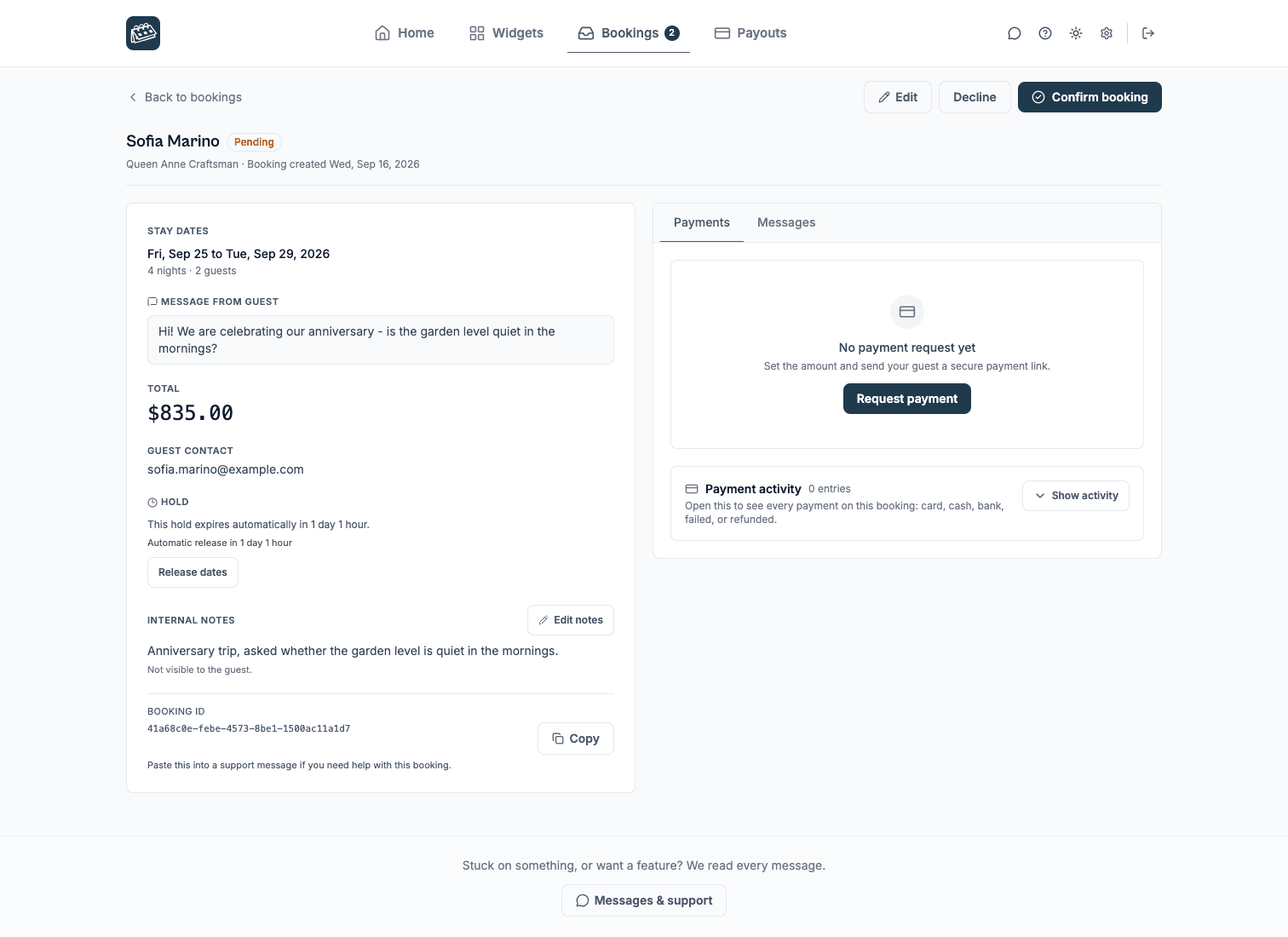
Every request lands ready to decide on
A guest submits dates, guest count, and a message from your website. It arrives by email to up to three notification addresses and opens a secure review screen where you approve, decline, or send a payment link - all with the full stay in front of you.
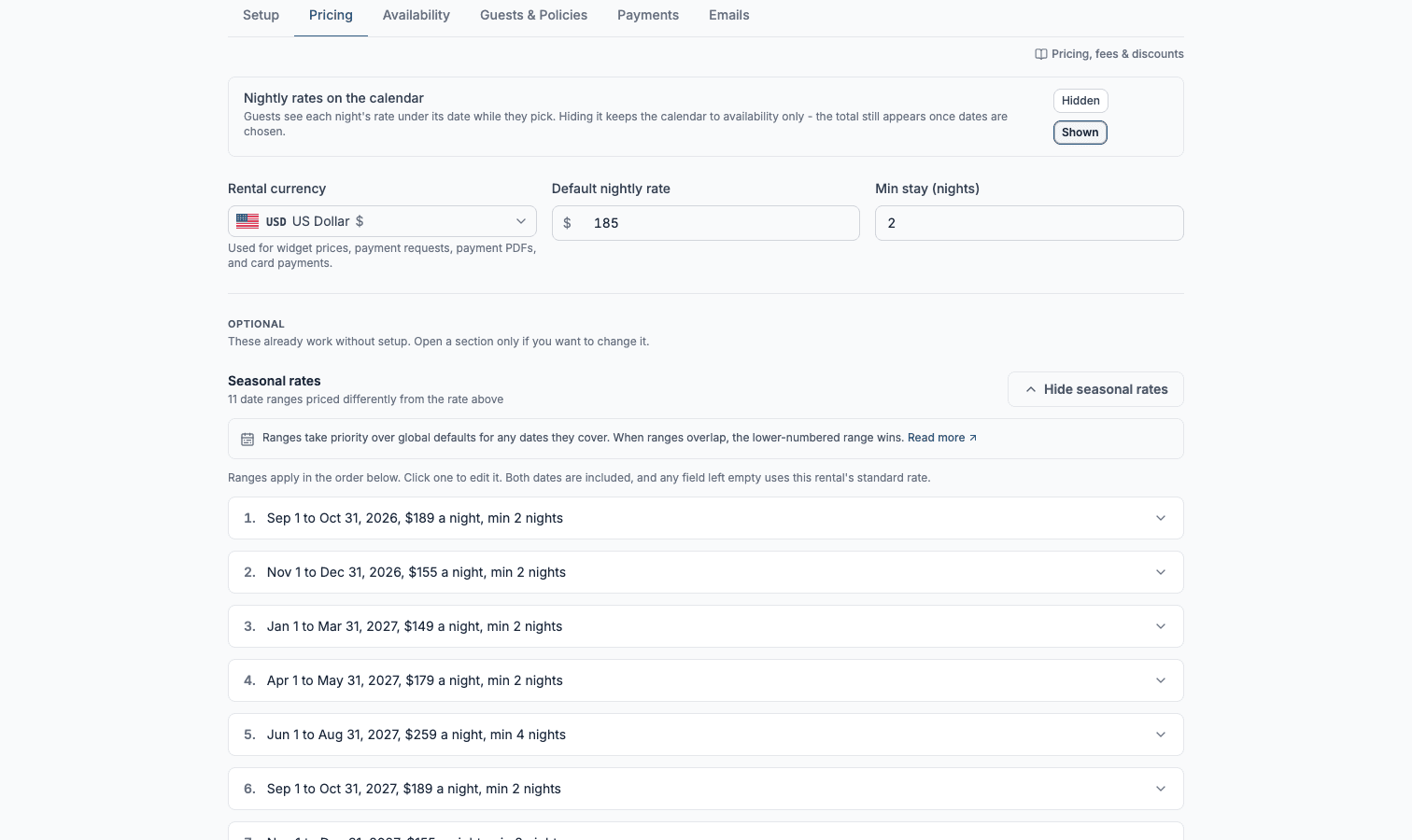
Price it your way, discounts and all
Set nightly rates, override them for seasons, add cleaning or pet fees, and layer on length-of-stay discounts. Set your own child rates by age, and charge fees per adult, per child, or per guest. Run coupon codes with usage limits and expirations. Show the total to guests or keep pricing hidden and quote manually after the request.
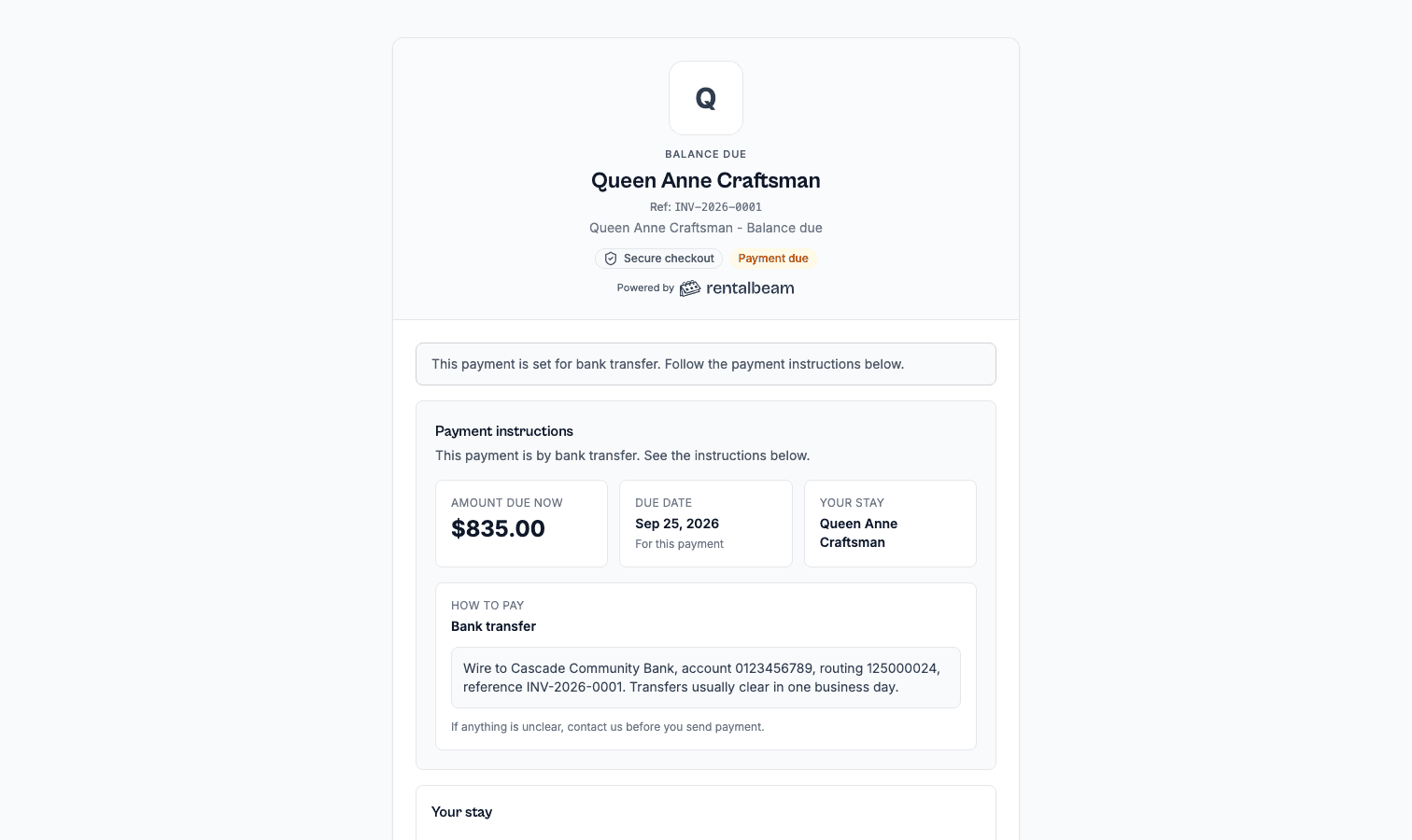
Get paid the way that fits, with no commission
We never take a cut of what you charge. Let guests pay by card in the widget through Stripe, send a secure pay-later link after approval, split a deposit and balance, or record cash and bank transfers yourself - and send branded invoice PDFs either way.
- 0%
- Our cut of your direct bookings
- 100%
- Of every direct booking stays yours - card payments only carry standard Stripe fees
- Your domain
- Bookings happen on your own website, not a third-party marketplace
Frequently asked questions
Does RentalBeam charge a commission or booking fee on Pro?
No. RentalBeam Pro takes no commission and no booking fee - your direct booking revenue is 100% yours. The booking form widget, guest payment workflow, coupon codes, seasonal pricing, custom fields, and booking rules are all included. The only cost when a guest pays by card through RentalBeam is the standard Stripe card-processing fee, which is paid to Stripe, not RentalBeam. Inquiry-only and pay-later flows have no per-transaction cost.
Does RentalBeam take a commission on my direct bookings?
No. RentalBeam never takes a commission on your booking revenue on any plan, and Pro adds no RentalBeam booking or application fee. If a guest pays by card through RentalBeam, only the standard Stripe card-processing fee applies - that fee goes to Stripe, the same as any payment processor. Inquiry-only, pay-later, and off-platform bookings (such as bank transfer) have no per-transaction cost at all.
Does RentalBeam support coupon codes and discounts?
Yes. RentalBeam Pro includes coupon codes, percentage and fixed-amount discount rules, and seasonal pricing tiers. You can run promotional codes for repeat guests, configure off-season discounts, and combine them with custom fees and booking rules from the same booking form widget setup.
Can I charge sales tax, VAT, or occupancy tax on my booking form?
Yes. RentalBeam Pro supports percentage fees built for taxes: you enter the rate (up to three decimals, so rates like 8.875% work) and it is calculated on the discounted subtotal plus your other fees, the same base tax authorities use. The rate can be added on top of your prices (US-style sales tax) or shown as already included in them (EU-style VAT, with an "Includes Tax" line under the total). You can exclude individual fees from the tax base when your jurisdiction does not tax them, and guests see the tax clearly labeled with the rate. Fixed per-person tourist taxes are also supported through per-guest-per-night fees with child age rules.
Can I message guests from my email inbox?
Yes. On Pro, every booking notification email includes a reply address linked to that booking. Reply in Gmail, Apple Mail, or any email app and your message goes to the guest. When they reply, it comes back to your inbox and is saved in the dashboard Messages tab. Your personal email address is never shared with the guest.
What is a vacation rental booking widget?
A booking widget is a form embedded on your own website that lets guests send reservation requests directly to you. It shows current availability, optionally displays pricing, and collects guest details in one form.
Does the booking widget replace Airbnb or VRBO?
No - it works alongside them. You keep your existing listings on those platforms and add a direct booking option on your own website, so guests who find you directly have a clear path to contact and book with you.
How does the booking form handle pricing?
Pricing display is optional and fully configurable. Set nightly rates, seasonal overrides, cleaning fees, pet fees, percentage tax rates (sales tax, VAT, occupancy tax), length-of-stay discounts, and coupon codes. Pricing supports a wide range of Stripe-supported presentment currencies, and you set one currency per booking form. Show pricing upfront, or hide it and quote manually after the request. Take inquiries only, approve the stay and send a secure payment link later, or turn on guest card payments inside the widget.
What happens when a guest submits a booking request?
You receive an instant email alert with the guest's details, dates, and contact information. The email opens a secure review page showing the full booking details before you act, and that page lets you confirm, decline, or send a payment link from the same secure screen. You can also reply directly to the notification email to message the guest from your inbox - their reply comes back to you. All messages are saved in the dashboard.
Can I hold dates while I review a booking request?
Yes. The Hold Policy setting controls how long a pending request holds the booked dates: Off (no hold), Expire automatically (you choose the duration; dates auto-release when it expires), or Never expire (dates stay blocked until you act). A reminder email can be sent before a hold expires.
Do availability dates sync with Airbnb automatically?
Yes. The booking widget reads from the same iCal sources as your availability calendar, which refreshes at most every 15 minutes (exact timing varies by platform). To prevent double bookings, instant pay-in-widget reservations go a step further: the widget re-checks your live availability at the moment a guest confirms, so a stay just booked on Airbnb or VRBO is caught before the reservation is accepted.
Which plan includes the booking widget?
The booking form widget is a Pro feature. Pro takes no commission and no booking fee on direct bookings - when a guest pays by card, only the standard Stripe card-processing fee applies, paid to Stripe, not RentalBeam. Pro also includes configurable fees, discount rules, coupon codes, custom form fields, seasonal pricing, booking rules, payment links, split payment steps, invoice PDFs with customizable details, and multi-currency support, with monthly or annual billing available. The 3-rental tier of Pro comes with a 7-day free trial on monthly or annual billing.
Can I embed the booking widget on any website?
Yes. The widget supports script or iframe embeds on Wix, Squarespace, WordPress, Webflow, and any builder that accepts HTML or scripts. Setup takes about 2 minutes.
Is my guests' information secure?
All data is transmitted over HTTPS and processed securely. Guest contact details are only visible to you - they are never shared or sold. The widget only displays availability to site visitors, never personal data.
Is there a widget or button to take direct bookings on my own rental website?
Yes. RentalBeam's booking form widget (Pro) embeds a direct booking form or button on your own website. Guests pick dates against your current availability and send a reservation request straight to you, with no Airbnb or VRBO in the middle. You can take inquiries only, approve the stay and send a secure payment link later, or accept guest card payments inside the widget.
How do I set up a commission-free direct booking process for my vacation rental?
Show your availability calendar on your website, add the RentalBeam booking form widget on Pro, and choose whether guests pay by card at booking, pay through a secure link later, or just send an inquiry. RentalBeam takes no commission and no booking fee on these direct bookings. When a guest pays by card, only the standard Stripe card-processing fee applies, and it is paid to Stripe, not RentalBeam. Inquiry-only and off-platform payments carry no per-transaction cost at all.
Can guests pay for a stay directly through the booking widget?
Yes, on Pro. Turn on pay-in-widget and guests pay by card through Stripe at the moment they book, with Apple Pay and Google Pay available where Stripe supports them. Before that reservation is accepted, the widget re-checks your current availability so a date just taken on another channel cannot be double booked. You can also collect a deposit now and the balance later with split payment steps.
What features should a vacation rental booking widget have?
A good vacation rental booking widget shows current availability with a clear check-in and check-out date picker, collects guest counts (adults, children, and pets) for accurate pricing, takes secure card payments, works well on mobile, and syncs over iCal with Airbnb, VRBO, and Booking.com to prevent double bookings. RentalBeam's booking form widget covers all of these on Pro, and takes no commission and no booking fee on your direct bookings.
Can the booking form take car, boat, RV, trailer, or equipment rentals?
Yes. Each rental has a kind. A stay speaks check-in, check-out and nights and asks for a guest count; a vehicle or equipment rental speaks pick-up, drop-off and days, is billed per day, and asks for no guest count, in all 25 languages the form speaks and in every email and document. Pricing, fees, coupon codes, custom fields such as a license upload, and Stripe payments work the same on both kinds. Bookings are whole days: a renter who picks up on Monday and drops off on Tuesday has booked one day. There are no hourly rentals or time slots.
Related Guides
Learn how synced availability, direct booking requests, payment setup, and a simple website embed fit together.
Ready to add bookings and payments to your website?
Start free, then upgrade to Pro when you want booking requests, secure pay-later links, invoice PDFs, and guest card payments on your own site - no full PMS or complex code required.