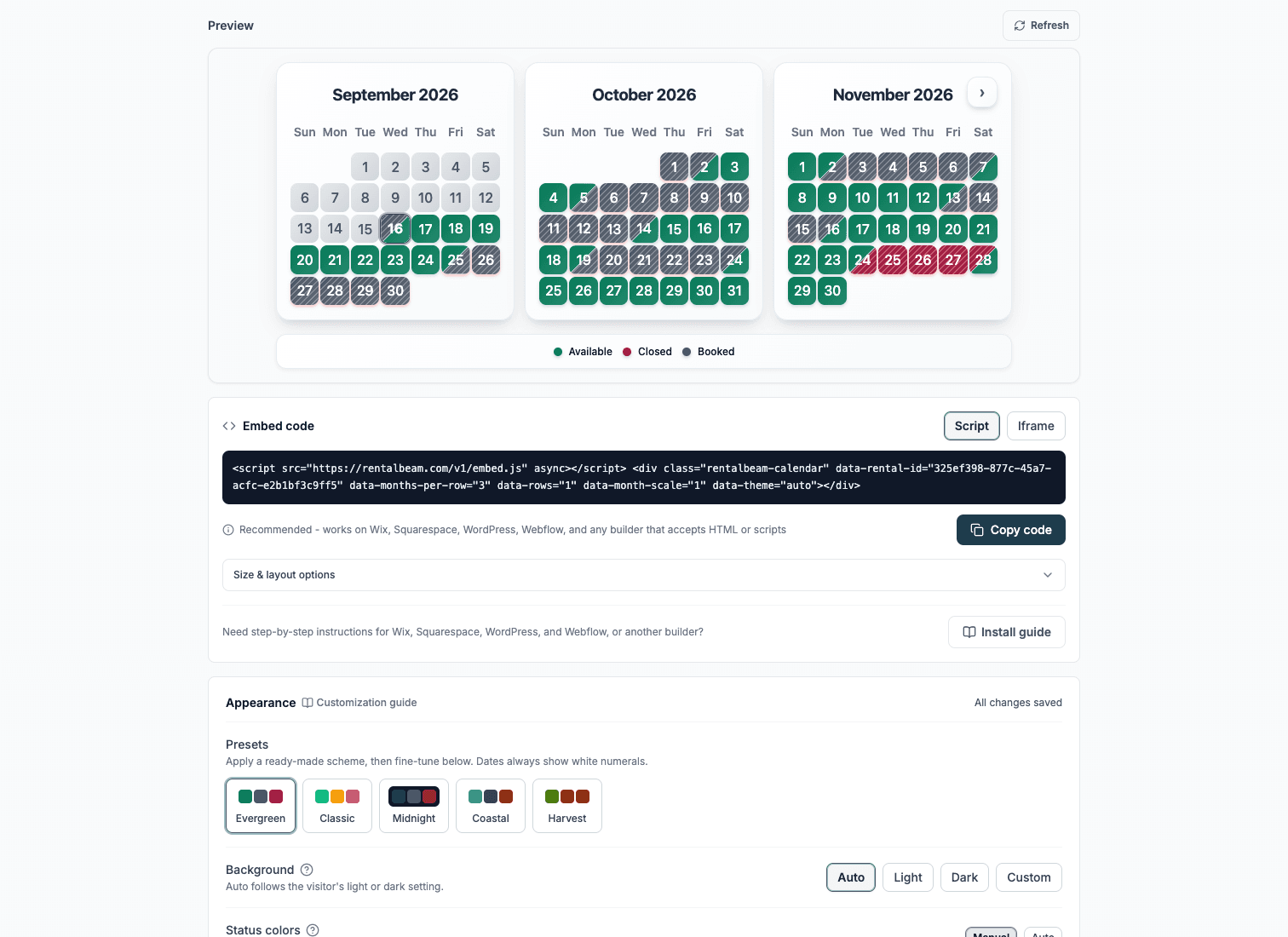
Calendly alternative for rentals: when you need day-based bookings, not time slots
Calendly is the best-known answer to "let people book me online", so rental hosts often reach for it first. Sometimes it is exactly the right tool - and sometimes the fit fails on day one, because an appointment and a stay are different shapes of booking. This guide explains that difference, when a time-slot scheduler is the right choice, and when a day-based availability calendar and booking widget fits better.
An appointment is a slot. A stay is a range of days.
Appointment schedulers like Calendly divide a working day into time slots: 15, 30, or 60 minutes each, with buffers between them and many bookings per day. An invitee opens your link, picks an open slot, and the meeting lands on your connected work calendar. That model is a genuinely good solution for meetings, tours, and calls.
A stay or a day-based rental has a different shape. The booking spans a range of days with a check-in and a check-out, one party occupies the whole property for those days, the price is calculated per day or per night (often with seasonal rates, fees, and discounts), and the availability behind it usually lives across Airbnb, VRBO, or Booking.com calendars that stay aligned through iCal feeds. A time-slot scheduler has no concept of any of that - not because it is a bad product, but because it is built for a different job.

When Calendly is the right tool
If the thing being booked is a block of time on someone's working day, a scheduler is the right category. In a rental business that covers more than you might expect:
- Property tours and viewings with a set duration and several slots per day
- Check-in hand-offs and key exchanges at agreed times
- Planning or sales calls with wedding and event clients
- Cleaner, maintenance, and photographer scheduling
For those jobs, an appointment scheduler will serve you better than any booking widget, because slots, durations, and meeting calendars are exactly what it models.
When a day-based booking widget is the right tool
If the thing being booked is the property itself for one or more whole days, you want a tool built around date ranges:
- Overnight stays with check-in and check-out dates - vacation rentals, B&Bs, cabins, apartments
- Day-based rentals such as cars, boats, RVs, and trailers, priced per day
- Venues and studios that host one booking per day, where a date is simply open or taken
- Pricing that changes by season, length of stay, fees, coupon codes, or guest count
- Availability that must match what Airbnb, VRBO, and Booking.com already show, via iCal sync
- Approval-first flows where you review the request before anything is confirmed or paid
Many hosts use both
The two categories do not compete. A scheduler handles your tours and client calls; a day-based booking widget handles the stay or rental itself. Keeping each tool on its own job is simpler than bending one into the other's shape.
Choose by the shape of your calendar day
Pick a scheduler (Calendly and similar) when...
- One day holds many separate bookings.
- Each booking has a duration in minutes or hours.
- The booking is a meeting on a person's calendar.
- Price per booking is flat or not collected at all.
Pick a day-based booking widget when...
- One booking spans one or more whole days.
- A booked date must show as taken for everyone else.
- The price is per day or per night, with seasonal rates.
- Availability must stay synced with OTA calendars.
What the day-based setup looks like with RentalBeam
RentalBeam covers the day-based side of the split. The free availability calendar embeds on your existing website and shows which dates are open or taken, synced from Airbnb, VRBO, Booking.com, Google Calendar, or any iCal URL. On Pro, the booking form widget takes direct requests against those same dates: guests pick a date range, see per-day pricing if you choose to show it, and either send an inquiry, request the dates for you to approve, or pay by card in the widget. RentalBeam takes no commission and no booking fee on direct bookings.
The same day-based model fits more than lodging - see the guides for vacation rentals, car rentals, boat rentals, and event venues that host one event per day. If you are weighing the three request flows, start with inquiry only vs request now vs pay in widget.