

Location map widget
Rental map widget for your own website
Put your location on any page with one line of website code. Choose one of five themes, match the pin to your brand, and decide whether guests see your exact spot or only the area around it. Embedding needs Plus or Pro.
Location
Guests judge a rental by where it is. A map on your site keeps them reading instead of looking the address up elsewhere.
How far is the beach?
Before anyone reads your amenities they want to know where they would be staying: how far from the beach, the ski lifts, or downtown. Your map answers that on the page, instead of sending a guest off to search for the address and losing them to a listing site on the way back.
Your pin, in your color
Choose a teardrop, a plain dot, or the photo you already set for that rental. The pin picks up your booking accent color on its own, or you can set a signature color just for the map.
Directions in one tap
An exact-pin map carries a directions link, so a guest opens the route in the maps app they already use on their phone, without you emailing the address twice.
Location privacy
Show the exact pin, or only the area around it. Send guests to the door, or confirm the address after they book. Each rental picks one.
Exact pin
Default
Guests see the real spot you saved, plus any nearby highlights you added, and open the route in their own maps app. Drag the pin to the precise entrance or dock.
Approximate area
For hosts who share the address later
Guests see a shaded circle near your location instead of a pin, from 250 meters (about 800 feet) to 2 kilometers (about 1.2 miles) across. Exact coordinates never leave the server and highlights are withheld.
Nearby highlights
Add the places guests ask about. Up to 8 spots around your pin, each with an icon and a note you write.
A live map of an apartment in Trastevere, Rome. Tap a marker to read the host's note.
Collection maps
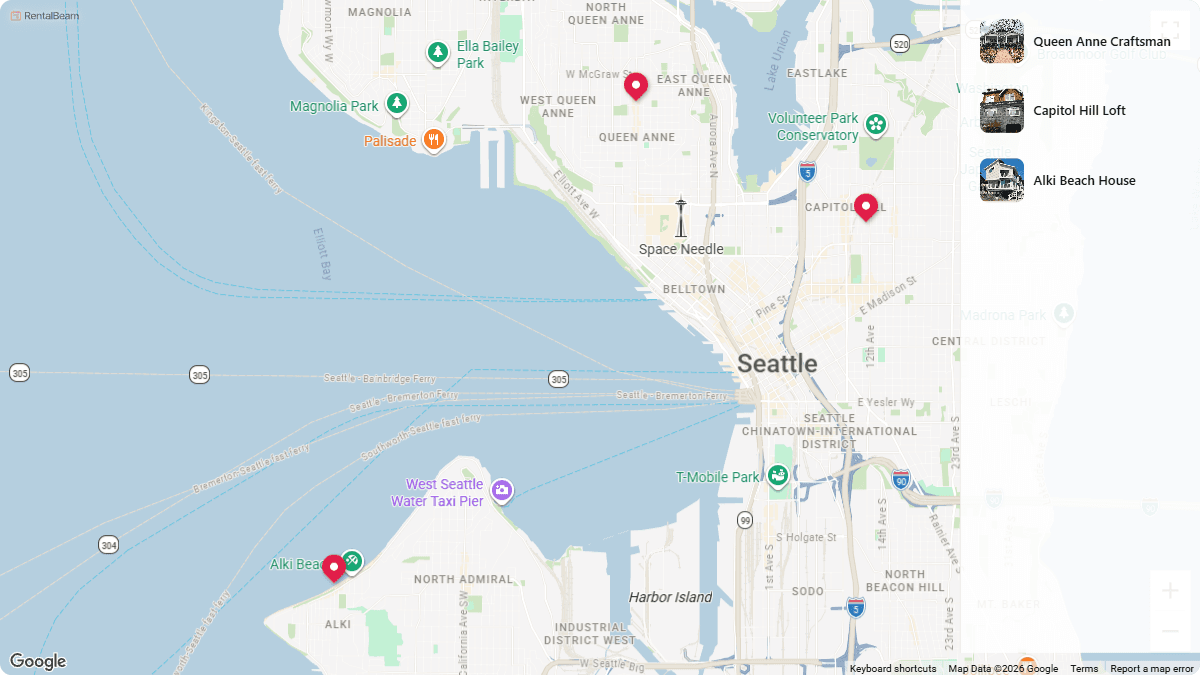
Several rentals, one map, and a list that follows the pins. Pins cluster as a guest zooms out, and each rental keeps its own location and privacy.
On your website in 3 steps
You can build, style, and preview a map on every plan, including Free. Embedding it on your own website is included with Plus and Pro.
Save your location
Open the rental, search for the address or drag the pin to the exact spot, and choose whether guests see that pin or just the surrounding area.
Pick a look
In the rental's Map section, choose one of five themes, a pin style, your signature color, and the shape and zoom you want. The preview updates beside the controls.
Paste the embed
Copy the script or iframe snippet and paste it into WordPress, Wix, Squarespace, Webflow, Weebly, GoDaddy, Framer, Google Sites, Hostinger, Carrd, Jimdo, Duda, Strikingly, Webnode, IONOS, SITE123, Zoho Sites, Webador, one.com, Square Online, Yola, Mozello, and any builder that accepts HTML or scripts.
Related guides. Map setup, embedding on your site builder, and the other two widgets.
Frequently asked questions.
What is a rental map widget?
A rental map widget is a small map you embed on your own website that shows where your rental is. Guests see a styled map with your pin, any nearby places you have added, and a link that opens the route in their own maps app. RentalBeam's map widget is one of three embeddable widgets (the others are the availability calendar and the booking form), and it drops in with the same one-line script or iframe snippet.
Can I hide my exact address?
Yes. Each rental has two location modes on its Details page. Exact pin shows your real spot with one-tap directions. Approximate area shows a shaded circle instead. You choose a radius from 250 meters (about 800 feet) to 2 kilometers (about 1.2 miles), and in that mode your exact coordinates never leave the server and nearby highlights are withheld, so the page a guest loads has nothing precise in it. It is the right setting when you would rather confirm the address with a guest after booking.
Which plan includes the map widget?
Every plan, including Free, can build, style, and live-preview a map in a rental's Map section. The builder itself is never locked. Embedding the map on your own website is included with Plus and Pro. On Free, a map embed still renders on RentalBeam pages and previews, but on any other website it shows a neutral "Map unavailable" notice instead of your map until you upgrade.
Does the map follow my website's dark mode?
No, and that is deliberate. You pick one of five themes: Signature, Terrain, Coastal, Midnight, or Minimal. You choose the theme, not the visitor's device setting, so every guest sees the same map. If your site is dark, Midnight is built for it.
Can I show several rentals on one map?
Yes. Build a collection of your rentals and embed it as one map with a pin for each. Pins cluster as a guest zooms out and separate again as they zoom in, and you can turn on a list beside the map. Clicking a rental in the list highlights its pin, and clicking a pin highlights its rental. Each rental keeps its own location, privacy mode, and settings.
Does the map slow my site down?
The map runs inside its own iframe and loads lazily, so the browser only fetches it once it scrolls into view. The rest of your page renders first and is never held up waiting for the map. The snippet you paste is a single script tag or iframe with nothing else to install.
Which website builders does the map widget work with?
WordPress, Wix, Squarespace, Webflow, Weebly, GoDaddy, Framer, Google Sites, Hostinger, Carrd, Jimdo, Duda, Strikingly, Webnode, IONOS, SITE123, Zoho Sites, Webador, one.com, Square Online, Yola, Mozello, and any builder that accepts HTML or scripts. Copy the snippet from the rental's Map section, paste it where you want the map, and you are done, the same embed method the calendar and booking widgets use.
Put your rental on the map
Build and preview your map on any plan, including Free. Embedding it on your own website comes with Plus and Pro.