Booking confirmation emails for vacation rentals: what to include, with real examples
A booking confirmation email has to answer six questions before the guest closes it: what was booked, which dates and how long, who is coming (or, on a vehicle rental, when it is picked up and dropped off), what has been paid and what is still due, what happens next, and how to reply. Everything else is decoration. This guide walks the six, shows the whole sequence of emails a direct booking sends with the line each one opens on, and prints three real ones so you can copy what works.
What must a booking confirmation email include?
Six things. A guest who reads all six closes the email and stops worrying, which is the entire job.
| What to include | Why it matters | Where it sits in a RentalBeam email |
|---|---|---|
| What was booked | The guest may have written to three places that week | The rental name in the header, and the first row of the summary |
| The dates and the length | "3 nights" settles an argument a date pair can start | Check-in, Check-out, and Duration. A vehicle rental says Pick-up, Drop-off, and "2 days" |
| Who is coming | The guest checks their own headcount here | A Guests row. A vehicle rental has no guest count, so the row is left out |
| What was paid and what is still due | The single most common reply is "did that go through?" | Paid today, the itemized total, and a Remaining balance row only while money is still owed |
| What happens next | Silence reads as a problem | One box: "You are all set", "What's next" with the day the rest is due, or "Nothing to pay right now" |
| How to reply | A guest with a question and no reply address writes to nobody | "Reply to this email anytime if you need anything", and the reply lands in your inbox |
Which emails does a direct booking send, and in what order?
A direct booking is a short conversation, not one message. Here is the whole sequence, with the line each email actually opens on. Each one that speaks to the guest greets by first name; the payment request is the bill itself and opens with the charges.
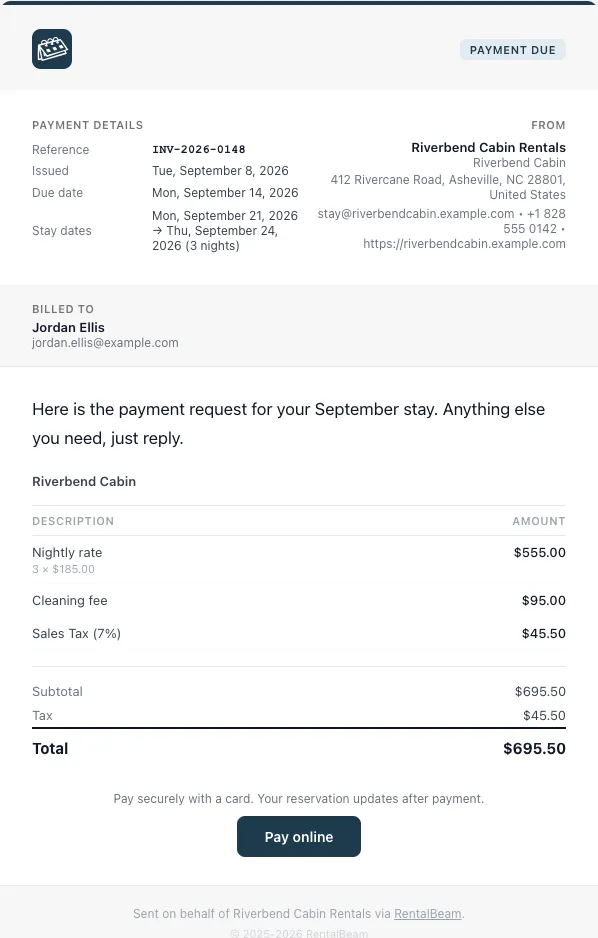
Request received. Sent the moment a guest submits an Inquiry or Request to book form. It opens "Hi Jordan, we received your request for Riverbend Cabin. We'll let you know whether your dates are free." Where you hold dates while you review, the same sentence says for how long.
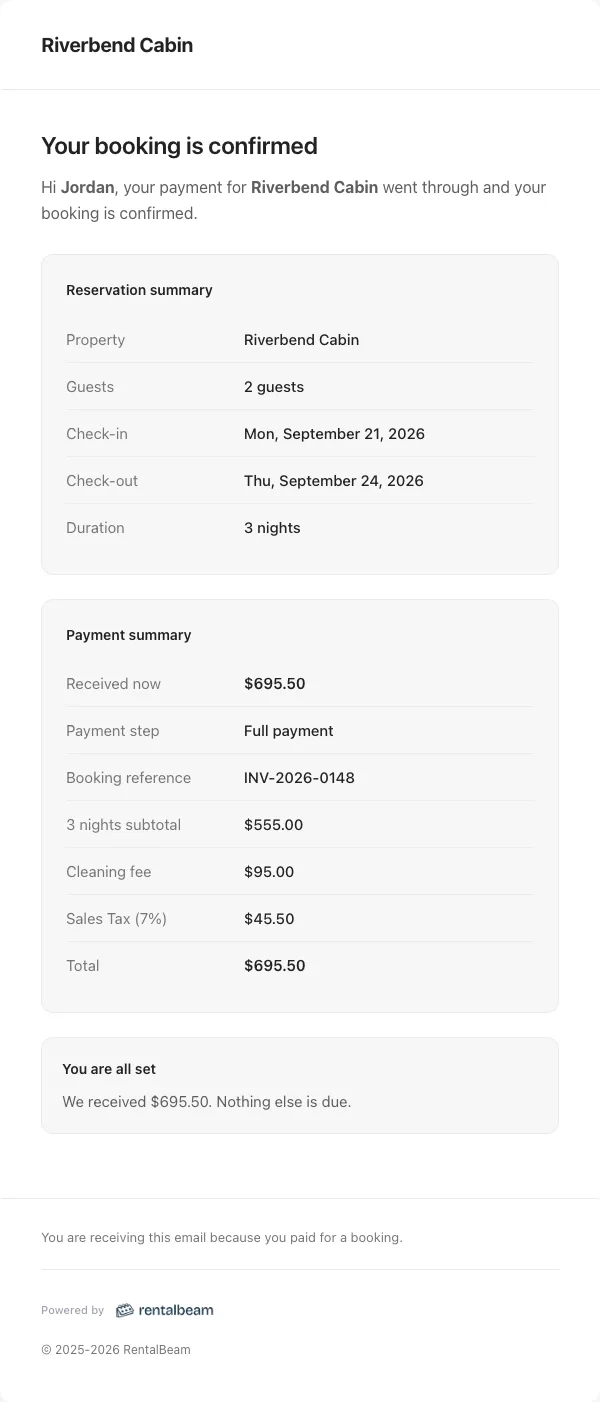
Your booking is confirmed. Sent when you confirm, or the second a card payment settles. Paid, it opens "Hi Jordan, thank you for your payment. Here are your booking details." Unpaid, it opens "Hi Jordan, everything is set for your stay at Riverbend Cabin."
Payment request. The bill, headed "Payment request", with the nightly rate and its quantity, each fee on its own line, tax on its own line, a subtotal, the total, and the due date. One button, "Pay online", under the line "We'll confirm by email once you've paid." Once it is paid the same email becomes "Payment details" and stops asking for money.
Payment confirmed. The receipt. "Hi Jordan, here is your receipt for Riverbend Cabin." It names what arrived, and the remaining balance only when there is one.
Payment reminder. Two moments, one email each. Before the due day: "Hi Jordan, a quick reminder that the Balance for your stay at Riverbend Cabin is due on Mon, September 14, 2026." Once it is late, once: "the Balance ... was due on Mon, September 14, 2026 and we have not received it yet. If it is already on its way, please ignore this email. If you need more time, just reply and let us know."
Your booking dates changed. Sent when you move a booking. "Hi Jordan, the dates of your stay at Riverbend Cabin were updated. The details below replace your earlier confirmation." The word "replace" is deliberate: a guest with two confirmations in one inbox needs to be told which one wins.
Declined, expired, or canceled. Three different facts, so three different emails. A declined request opens "we reviewed your request ... and can't take this booking", and offers different dates. An expired one says the dates are open again and a new request is welcome. A canceled booking says the dates are no longer reserved. None of them leave the guest guessing which of the three happened.
What does a real one look like?
Which mistakes cost you replies?
| The mistake | What the guest thinks | The fix |
|---|---|---|
| "Hi Jordan Ellis," | A machine typed this | Greet with the first name, and keep the full name in the details table below |
| A due date on a request that is already paid | "Do I owe more?" | A settled request shows what was charged and drops the due date |
| "21/09/2026" or "14:00" to a US guest | Reads it twice, gets it wrong once | One date format per audience. RentalBeam writes "Mon, September 21, 2026" |
| Two buttons of equal weight | Picks neither | One dominant action per email, and everything else is a plain link |
| "Our system re-checks availability" | Why is it telling me this? | Say the outcome: your dates are held, or your booking is confirmed |
| A no-reply sender | Replies to nobody, then calls | A reply address that reaches you, and one line in the email saying so |
The last one is worth more than the other five together. On Pro, booking notification emails work both ways: a guest replies to the email they were sent, the reply reaches you, and the thread is saved on the booking in your dashboard, so the answer is not stranded in one person's phone.
How do you see your own emails before a guest does?
Every email RentalBeam writes for a rental is listed in one place, and every row that stands for an email carries a Preview link.
- 1
Open the Emails section
Open the rental from Rentals, then choose Emails in the side menu under Bookings. That section is the complete list of every email sent for the rental, so nothing arrives that you have not seen listed.
- 2
Hit Preview
The preview opens the real template, rendered with your rental name, your booking type, your currency, your accent color and your logo, around fixed sample guest data. The subject line sits above it, and a Desktop and Phone width sit beside it.
- 3
Send me a test
Inside the preview, Send me a test emails that same rendered message to the address you signed in with, and to no other address. Read it on your phone, in a real inbox, before a guest does.
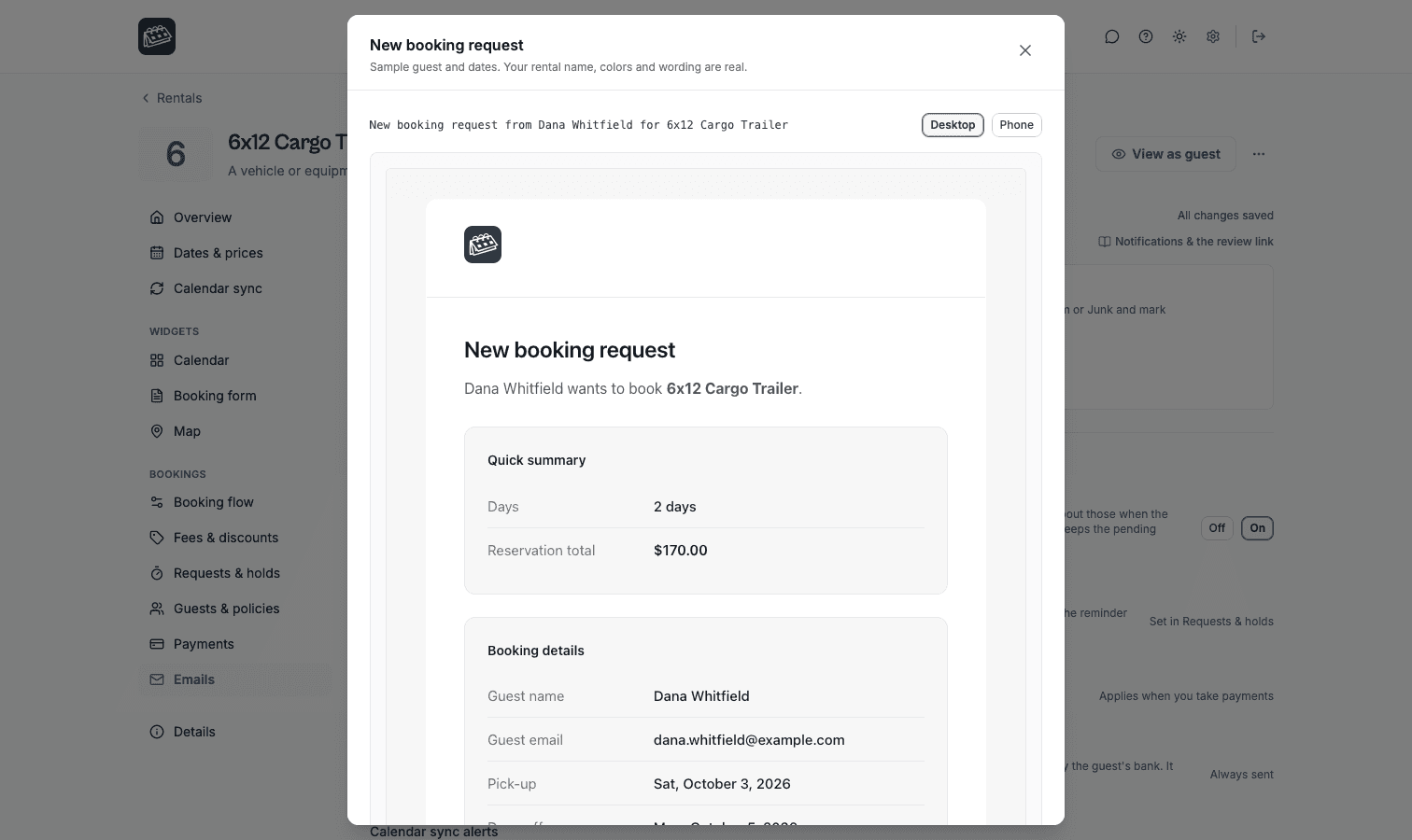
A trailer, a boat, or a car reads differently
Set the rental kind to a vehicle or equipment and every one of these emails switches vocabulary: Pick-up, Drop-off, "2 days", "your rental of the car hauler", and no guest count anywhere. The dates and the arithmetic are identical. Only the words change, and the guest sees the words.
The copy-paste checklist
Run any confirmation email you send, from any tool, against this list.
- The rental name is in the header and in the details, spelled the way the guest saw it on your website.
- The greeting uses the first name only.
- Check-in and check-out, or pick-up and drop-off, are both present, each with a weekday.
- The length is written out: "3 nights", not left for the guest to subtract.
- The guest count appears for a stay, and is absent for a vehicle rental.
- The price is itemized: rate and quantity, each fee on its own line, tax on its own line with its rate, then the total.
- The money already received is stated, and any remaining balance carries the day it is due.
- There is exactly one dominant button, and it goes to the payment page.
- One sentence says what happens next, in outcome words, with no mention of your tools.
- The email invites a reply, and the reply address is one you read.
- The date format matches your guests, not your server.
- You have read the email yourself, in your own inbox, on a phone.
A confirmation email is the first thing a guest owns after paying you. Get these twelve right and most of the questions you answer by hand stop arriving.