

Link Page
One link for a rental that guests can open to see your dates and book. No website needed.
A link page is a single page for a rental at rentalbeam.com/r/your-rental. It shows the rental's photo, its name, your own words and your links, with your calendar to book from. Put it in your Instagram bio, send it in a reply to a guest, or print it as a QR code for the house. It is on every plan and off until you turn it on. With several rentals, a collection gets one page for all of them.
What guests see
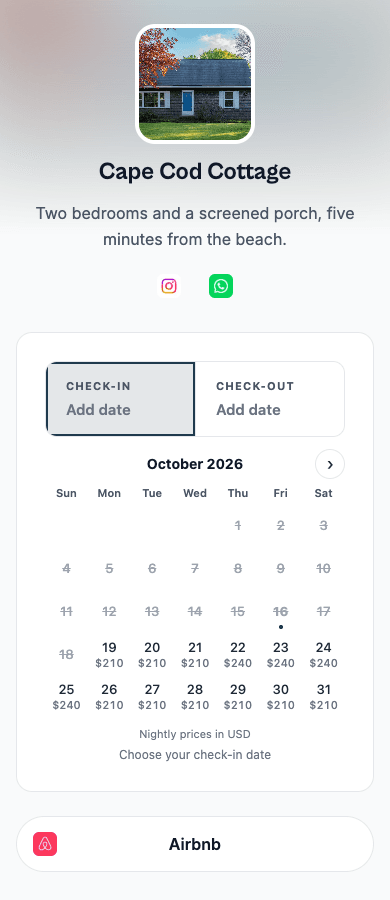
| Part | What it shows |
|---|---|
| Photo and name | From the rental's Details section |
| About this rental | Your own words, shown exactly as written, in every language |
| Social links | Instagram, Facebook, TikTok, YouTube and WhatsApp, as icons under your words |
| The calendar | On Pro with bookings on, the booking form with its calendar open: guests pick dates, see the total and send a request or pay. Otherwise, your availability calendar |
| Map | On Plus and Pro, when you turn it on and the rental has a location |
| Other links | Up to five in total, such as your Airbnb or Vrbo listing, as buttons under the calendar |
A shared link shows the rental's photo and name in WhatsApp, iMessage and most chat apps. The page carries no RentalBeam mark.
Turn it on
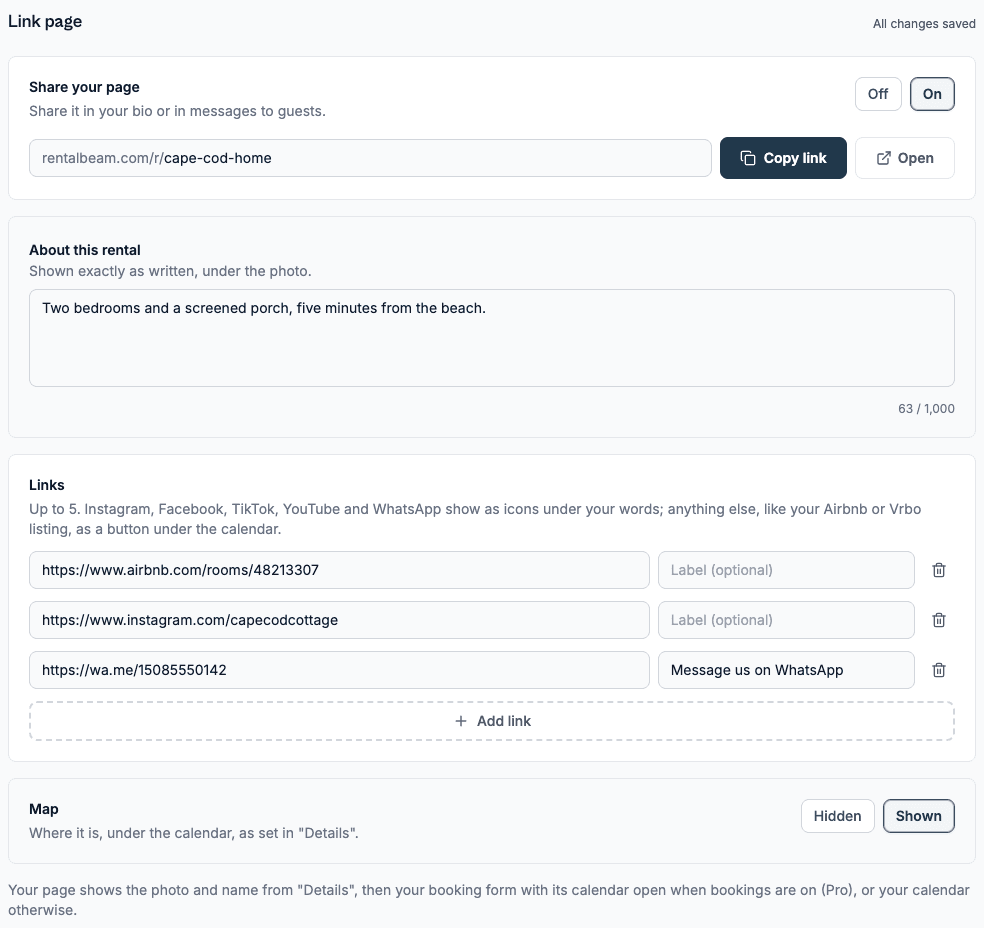
Open the rental from the Rentals tab and choose Link page under Widgets. Set Share your page to On, then press Copy link. Everything saves as you type.
| Setting | What it does |
|---|---|
| Address | Starts from the rental's name. Change it in the box and it saves when you leave the box. Links you already shared keep working: the old address leads to the new one |
| About this rental | Up to 1,000 characters, shown under the photo |
| Links | Up to five full web addresses, each with an optional label. Leave the label empty and the page names the site, for example "Airbnb" |
| Map | Shown or Hidden. Hidden until you change it. Appears on Plus and Pro once the rental has a location |
One page for several rentals
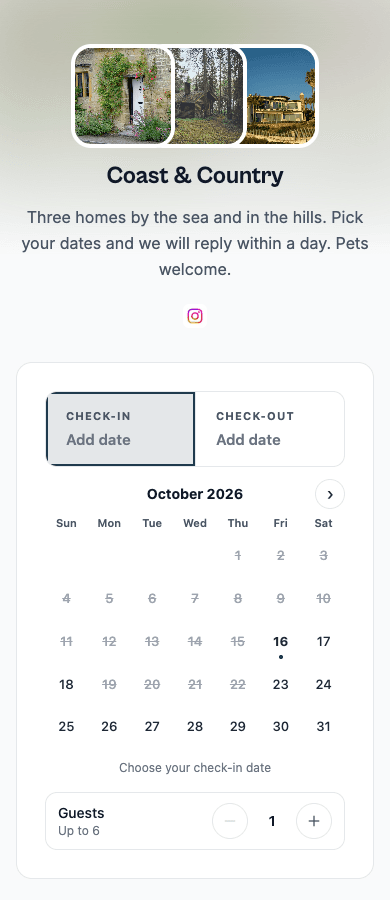
A collection has its own link page, for a bio with room for one link. Open the collection from the Rentals tab and choose Link page. It has the same settings as a rental's page and shows the collection's name, each rental's photo, then the collection booking form on Pro, where guests pick dates and then a rental, or the combined calendar otherwise. The map shows a pin for each rental with a location. Collections are on Plus and Pro.
Rental pages and collection pages share one set of addresses, so each address leads to one page.
Plans
| Plan | What the link page shows |
|---|---|
| Free | Your availability calendar, your words and links |
| Plus | Adds your prices on the calendar's open days, when switched on, and the map |
| Pro | The booking form with its calendar open, so guests book from the page, and the map |
The page follows your plan the same way your website would: see Plans & limits. If you change plan, the page stays up and shows what the new plan includes.
What it does not do
A link page is one page, not a website, and it does not bring guests by itself. It is where you send people you already reach: followers, past guests and anyone who asks about dates. To show your calendar or booking form on a website you already have, see the calendar embed guide and the booking form embed guide.
Turning the page off, or archiving the rental, makes its address answer "not found" until you turn it on again.