

Pricing, fees & discounts
What a guest pays, and how you control it: nightly rate, seasonal pricing, fees, and discounts.
Before you start
You need bookings switched on for this rental. Open the rental from the Rentals tab, choose Turn on bookings in its side menu, and press Turn on bookings. Fees, discounts, and coupons then live in the Fees & discounts section beside it. The nightly rate and seasonal prices are set in Dates & prices, also in the rental's page.
Show or hide pricing
Choose whether guests see a price total on the booking form. If your booking flow is set to Pay in widget, pricing is always shown. A guest has to see the amount before they can pay it.
Nightly rate & currency
Open the rental, then Dates & prices. With no dates selected, Your usual settings holds the usual price for a night and the rental's currency. Once the rental takes bookings, the currency is set in Fees & discounts with the payout account instead. RentalBeam supports multiple currencies across your rentals. If card payments are turned on, the rental's currency must match the default currency of the payout account assigned to it. See Guest payments.
Minimum stay
Set your usual minimum stay, the fewest nights a guest must book, under Length of stay in Your usual settings on Dates & prices. You can give some dates their own minimum.
Seasonal pricing
Give some dates their own price, like peak season. Open the rental, then Dates & prices. The calendar shows the price under each open night. Tap a first day and a last day. A panel shows what those dates are now, with a box for each setting: Price, Minimum stay, open or closed, and Arrivals and departures. Type a price and press Save. A price never changes the minimum stay, and each one can be set on different dates. To change only some days of the week in a long range, such as Fridays and Saturdays, use Only on these days of the week. Press Use my usual price to go back. A date with its own price shows in bold, and every other night keeps your usual price and minimum stay. There is no limit on how many dates can have their own price. You can set nights up to three years ahead.
Weekend price
Charge more on the nights you choose, Friday and Saturday by default (Saturday and Sunday for a vehicle), with the Weekend price switch in Your usual settings on Dates & prices. Add a percentage or a fixed amount to the standard rate. A day you gave its own price keeps exactly that price; the weekend price only raises the standard rate. It is off until you turn it on.
Fees
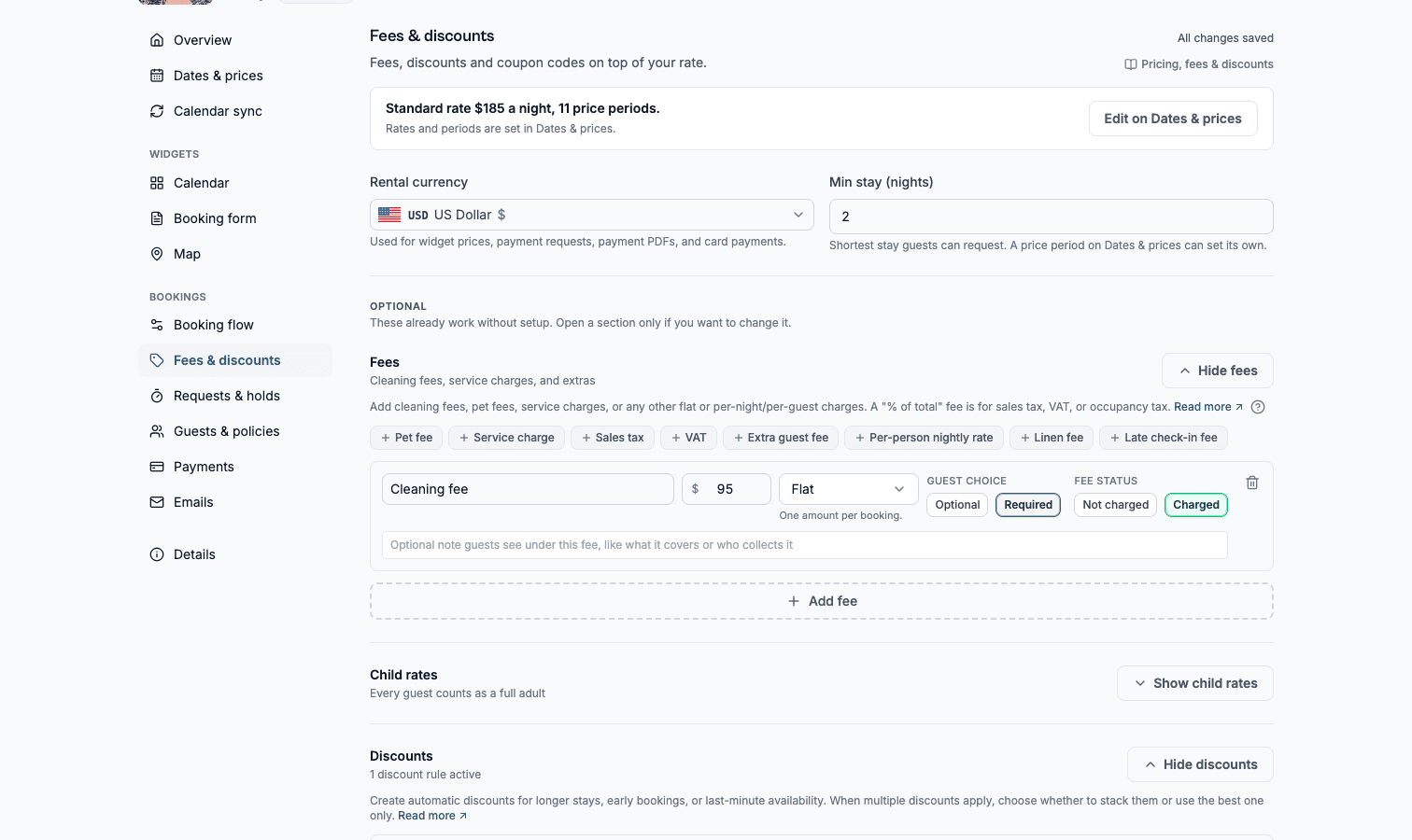
Fees are the only way to charge a guest anything beyond the nightly rate. A custom form field can never carry a charge. Add a cleaning fee, a service charge, or any other extra.
| Fee type | How it works |
|---|---|
| Required | Added automatically to every reservation total. The guest cannot opt out. Use this for a cleaning fee or service charge. |
| Optional | Shown to the guest as an extra they can choose to add before booking, such as early check-in or an extra guest. |
A fee scales one of five ways:
| Fee type | What it charges |
|---|---|
| Flat | A fixed amount, once per booking. |
| Per night | A fixed amount for each night of the stay. |
| Per guest | A fixed amount for each guest on the booking. |
| Per guest per night | A fixed amount for each guest, for each night. |
| % of total | A percentage rate, for sales tax, VAT, or occupancy tax. Type the rate to three decimals, so 8.875% works. |
A percentage fee is calculated on the discounted subtotal plus your other fees, the same base tax authorities use. Two percentage fees never tax each other. Whether a separately stated fee like cleaning is taxed varies by jurisdiction. So once you have a percentage fee, every other fee row shows a tax base switch: leave it on taxed, or exclude a fee your law does not tax.
A percentage rate is either added on top of your prices, the default, and how US sales and occupancy taxes work at checkout, or already in your prices, how VAT is usually shown in Europe. Added on top, the guest sees the tax as its own line with the rate right above the total; already in your prices, the total never changes and a quiet line under it reads "Includes VAT (20%)".
An included tax is always on. There is nothing for a guest to opt in to.
Every fee also has an optional guest note: one line shown under the fee in the booking form, in your own words. Use it to say what a charge covers ("Includes linens and towels") or who a tax is collected for ("City occupancy tax, collected on behalf of the city"). Notes you write are shown to guests exactly as typed.
A fee charged per guest also has an applies to setting: everyone, or adults only. Leave it on everyone for something like a per-person tourist tax, and set it to adults only for a charge that genuinely is about adults. To charge children a different amount, use an age band below rather than a separate fee. A band says it by age, which is more precise.
Charging for children
Turn on the adults and children counters in your guest settings, then add age bands under child rates. Each band covers an age range and says what a child that age costs. You only set the top age of each band. The next one carries on from there, so there are never gaps or overlaps. The last band decides what counts as a child at all: anyone older is an adult.
| Rate unit | What it means |
|---|---|
| % of adult fees | The child pays that share of every per-guest fee an adult pays. 0% is free, 50% is half. This is the one to use for a tourist tax that charges children a reduced rate. |
| Per night | The child costs a fixed amount for each night. They are then left out of your per-guest fees, so nothing is charged twice. |
A percentage scales your per-guest fees, never your nightly rate. Your nightly rate is the price of the whole place, so if you have no per-guest fees a percentage has nothing to work on. Charge a fixed amount per night instead.
Whether a child takes a bed is set separately, under Guests & policies: children under this age do not count toward your maximum. It is one age for the whole rental, and it is deliberately not tied to price: a child can be free and still take a bed, and a baby in a cot can still owe a per-person tourist tax.
Discounts
Set up automatic discount rules and choose a stacking mode that controls whether more than one discount can apply to the same booking, or only the best discount wins.
| Discount type | How it works |
|---|---|
| Length-of-stay | A lower rate the longer the guest stays, based on the number of nights booked. |
| Early-bird | A discount for guests who book far enough ahead of check-in. |
| Last-minute | A discount for guests who book close to check-in. |
Coupon codes
Create promotional codes guests can enter at booking to get a discount, separate from your automatic discount rules.
What your guest sees
Your guest sees a price breakdown on the booking form as soon as they pick dates. Nights come first, then each fee under the name you gave it, then any discount, then the total. A tax added on top gets its own line with the rate. Hide pricing and they see the form with no numbers at all.